Thank you. Your message is on its way to Stan. It could be that your feedback is already taken care of. You can check all the new updates from Mako below.
What's new
Everything we shipped in Mako in the last two months
For the last two months, making Mako better has been our #1 focus. We read every complaint and piece of feedback and worked through them one by one.
240 fixes and improvements since August 7
Major updates. Biggest first.
The screens below are the real app, filled with a demo brand.
Run AdsNew
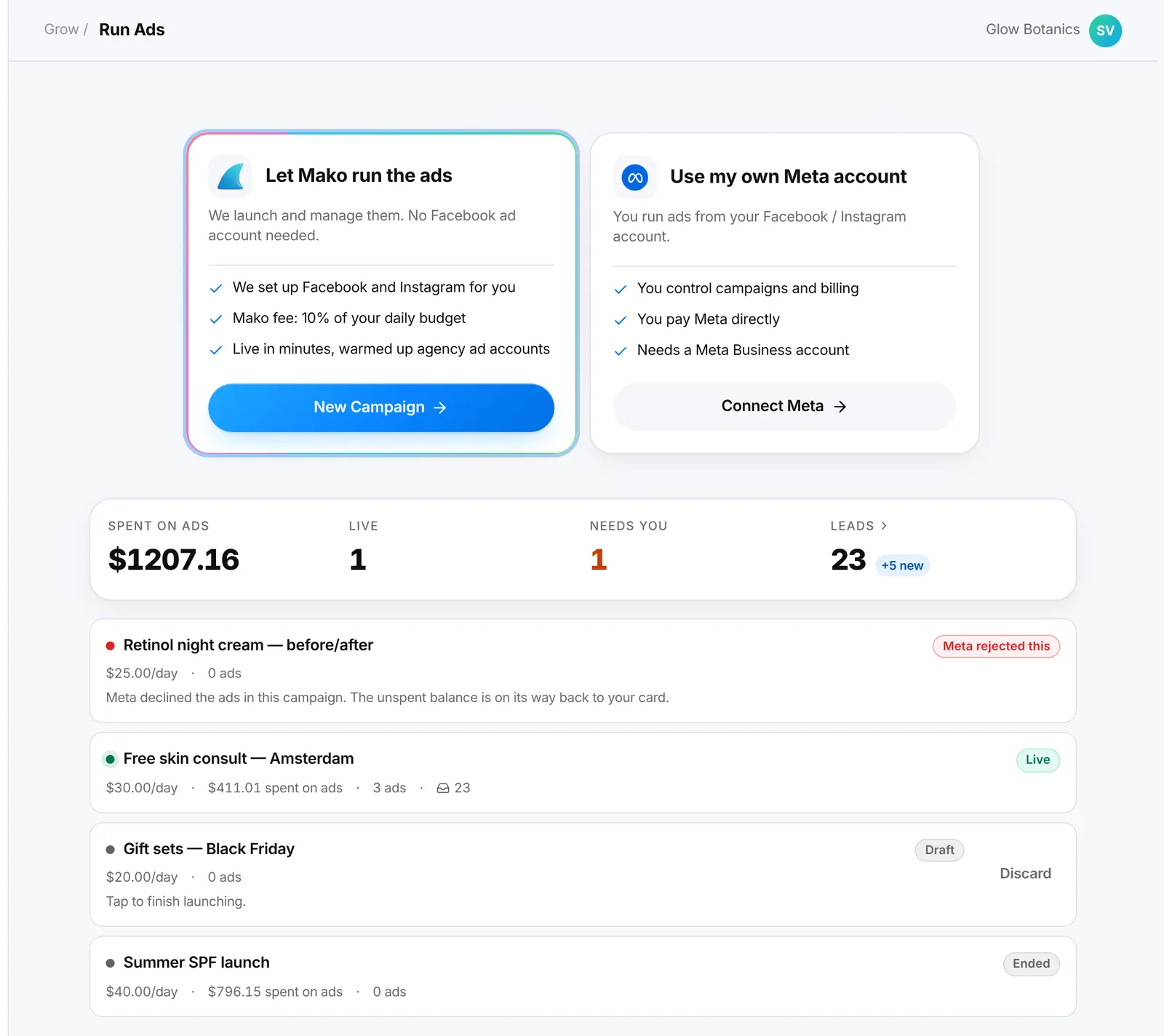
Mako can now run your Facebook and Instagram ads for you
Pick your ads, a goal and a daily budget. Mako launches them on its own ad account and keeps an eye on them, so you don't need a Meta ad account or any ads experience.
See what you spent, the clicks, the results and the cost per result
Pause, change the budget or stop any time; money you haven't spent comes back
Your ads are checked with Meta before you pay
app.trymako.ai/run-ads
Run AdsNew
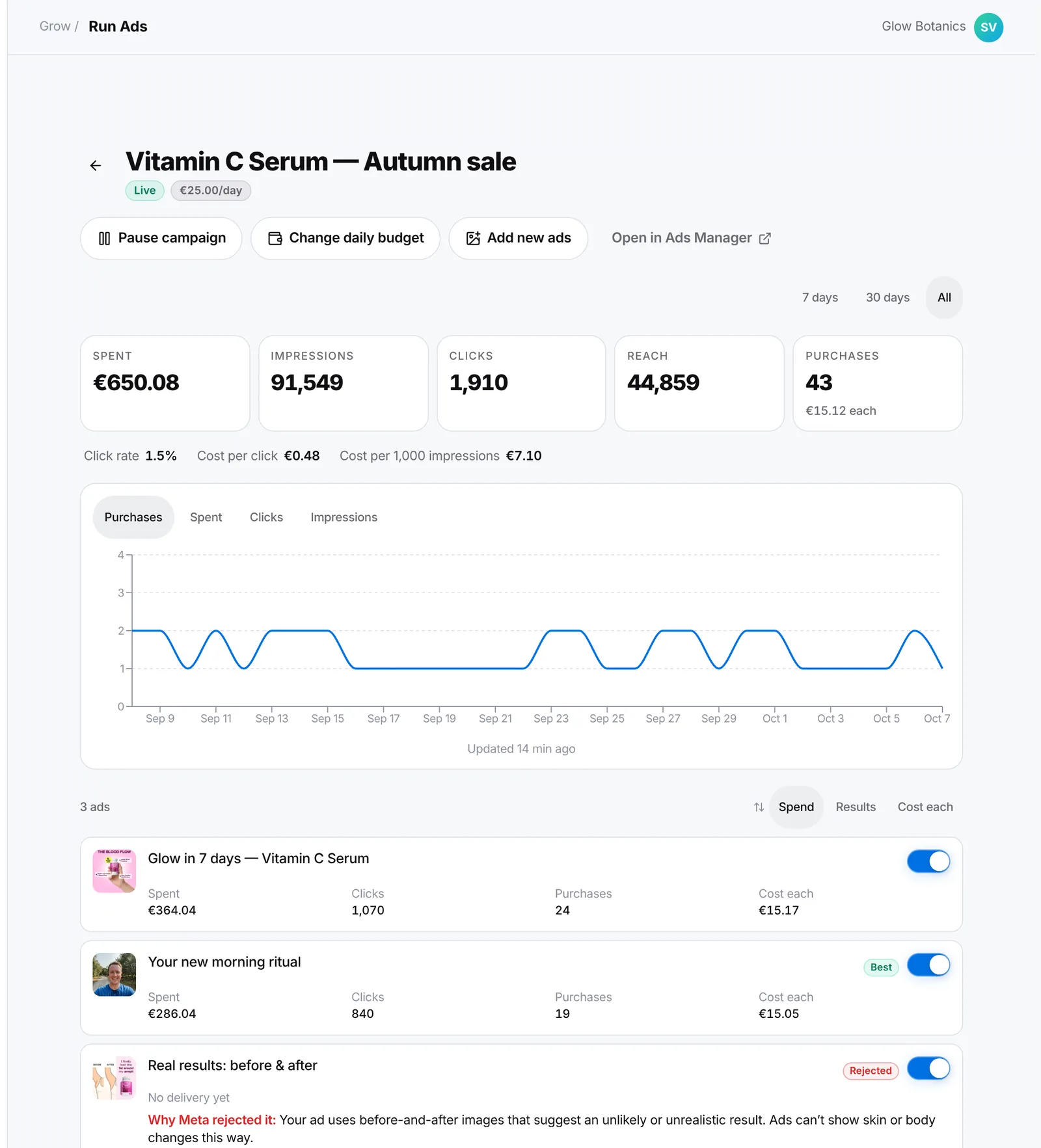
Every campaign on one page, with numbers you can trust
Run Ads shows each campaign's spend, clicks, reach and results, counted the same way as Meta Ads Manager, with a chart over 7 days, 30 days or all time.
Turn any single ad on or off with a switch
Pause, change the daily budget, add new ads or run an ended campaign again
If Meta rejects an ad, you see Meta's reason in plain words
app.trymako.ai/run-ads
Ask MakoNew
Ask Mako is now your operator: it does the work for you
Before, Ask Mako could only tell you which buttons to click. Now it reads your products and buyer research, proposes a plan and makes the ads itself: image ads, custom images and videos, testimonial videos, native stories and more.
Anything that spends credits stops on a card first, with every choice and the cost: Allow, Not now or Always allow
Watch every step live, with galleries you can tap and buttons that open the right screen
Your product photos and Brand Book are always used
app.trymako.ai/ask-mako
Ask MakoNew
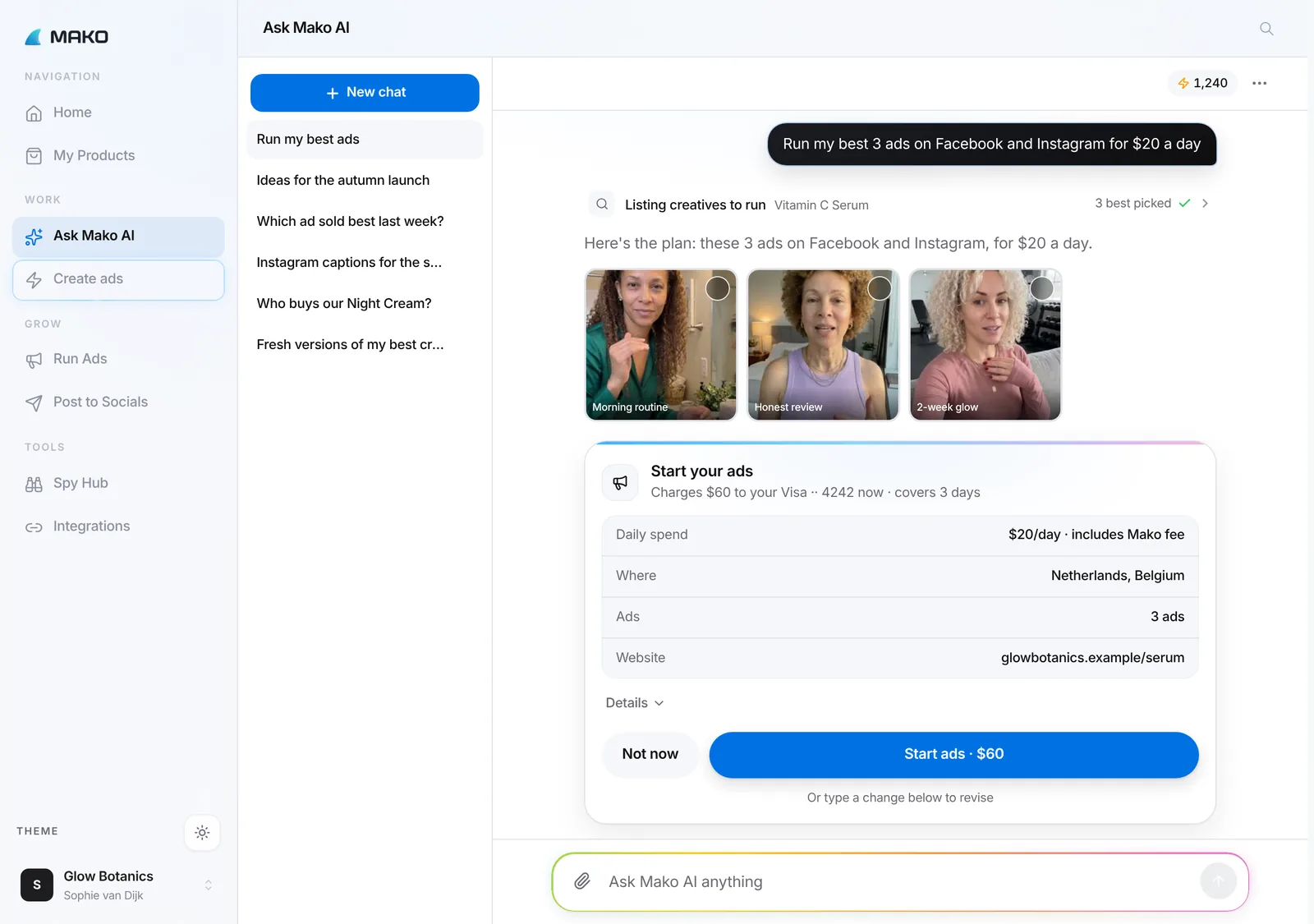
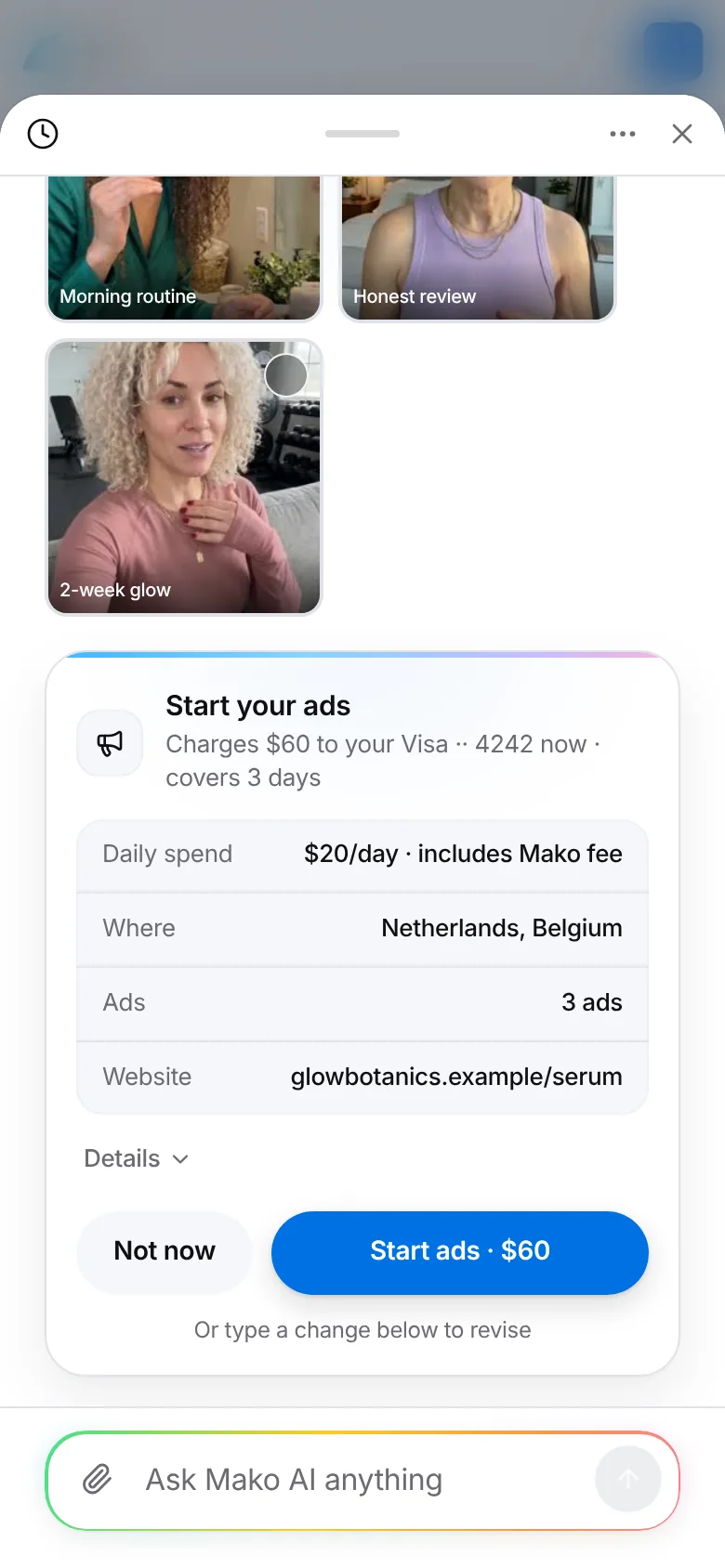
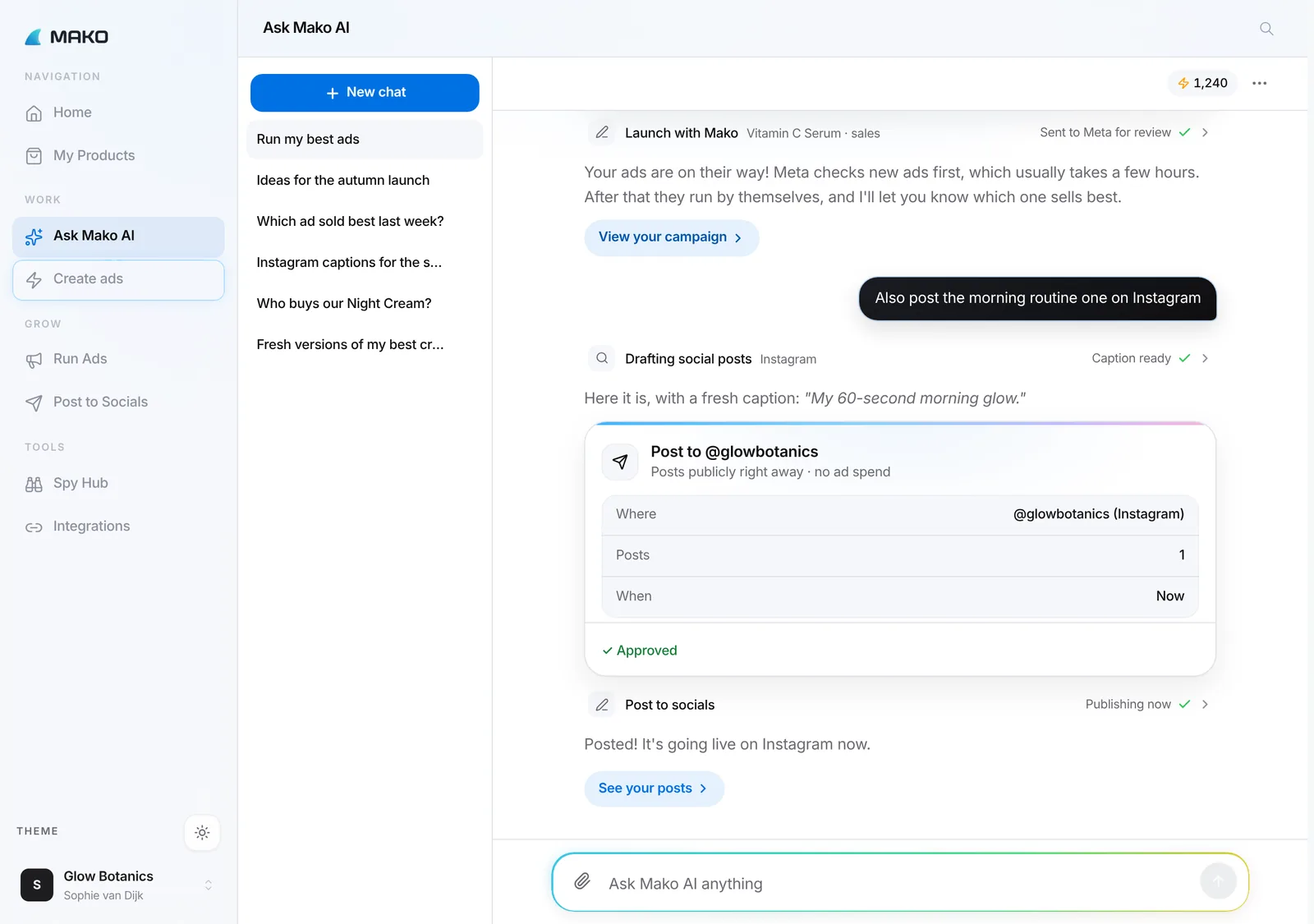
Ask Mako can launch your ads and posts, right from the chat
Tell Ask Mako what you want, like "run my best 3 ads for $20 a day". It fills in the details, shows one clear card with the cost first, and only goes ahead when you tap Allow.
Check, pause, resume or re-budget a campaign by asking
Turn your best Facebook and Instagram ads into new image and video variations
Ask why an ad works: Ask Mako can even watch your video ads
app.trymako.ai/ask-mako
SocialsNew
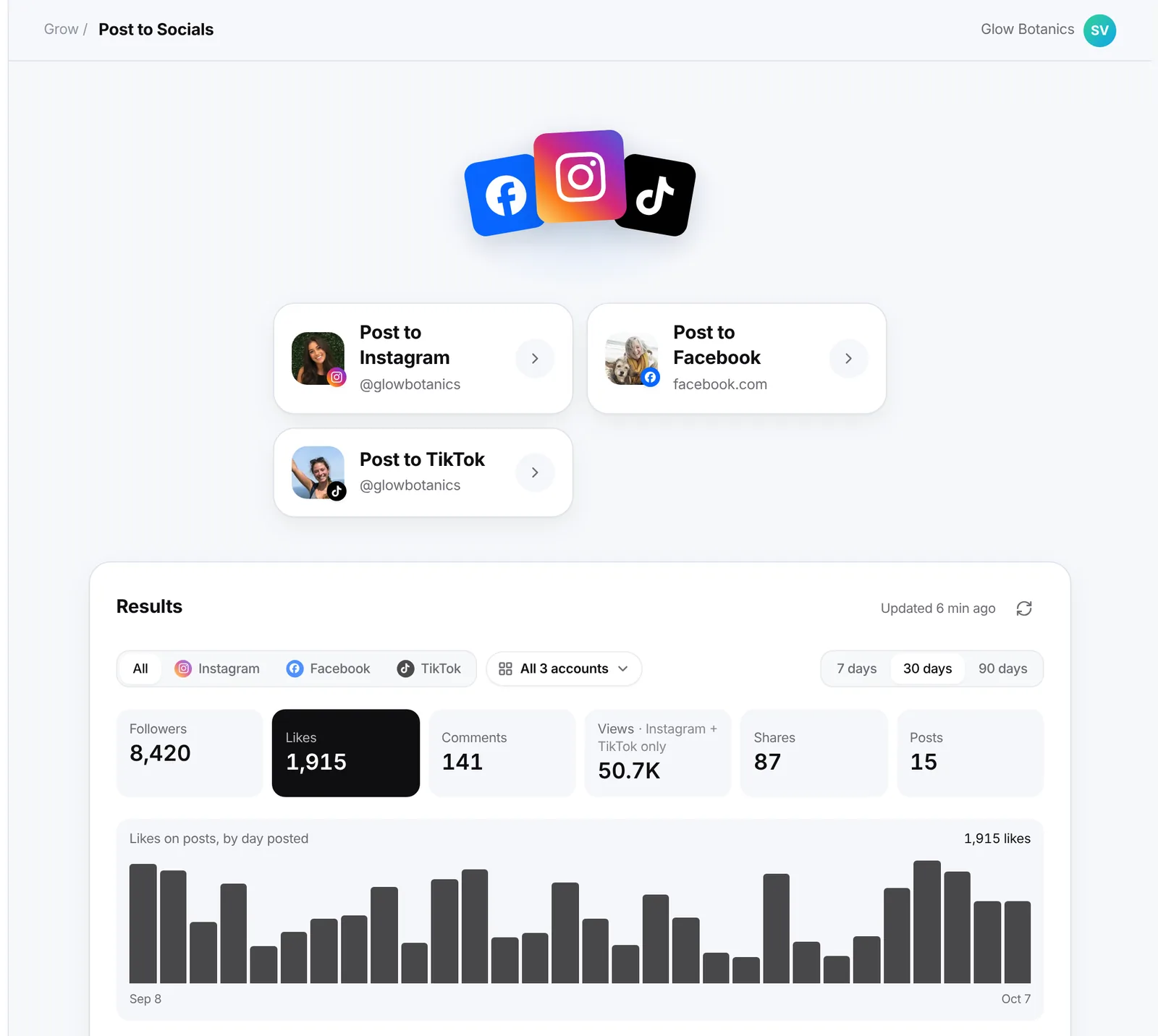
Post to Instagram, Facebook and TikTok, and see what works
Plan posts for all your accounts from one place, now including TikTok. One Results view shows followers, likes, comments and views for every channel, with a chart.
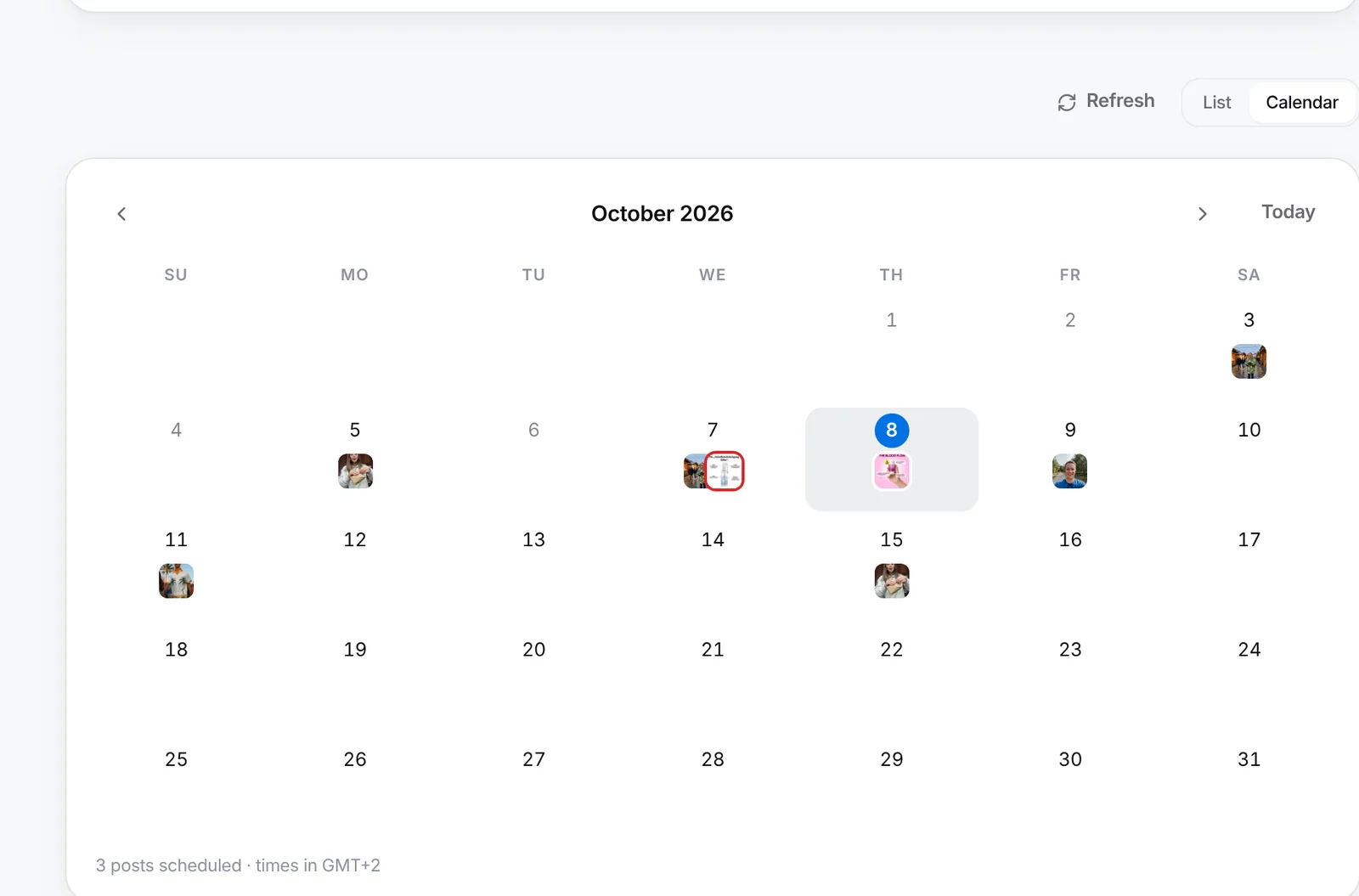
A calendar of everything you've planned
Edit, reschedule, retry or remove any post
Captions are free and are written for all your posts at once
app.trymako.ai/post-to-socials
app.trymako.ai/post-to-socials
Run AdsNew
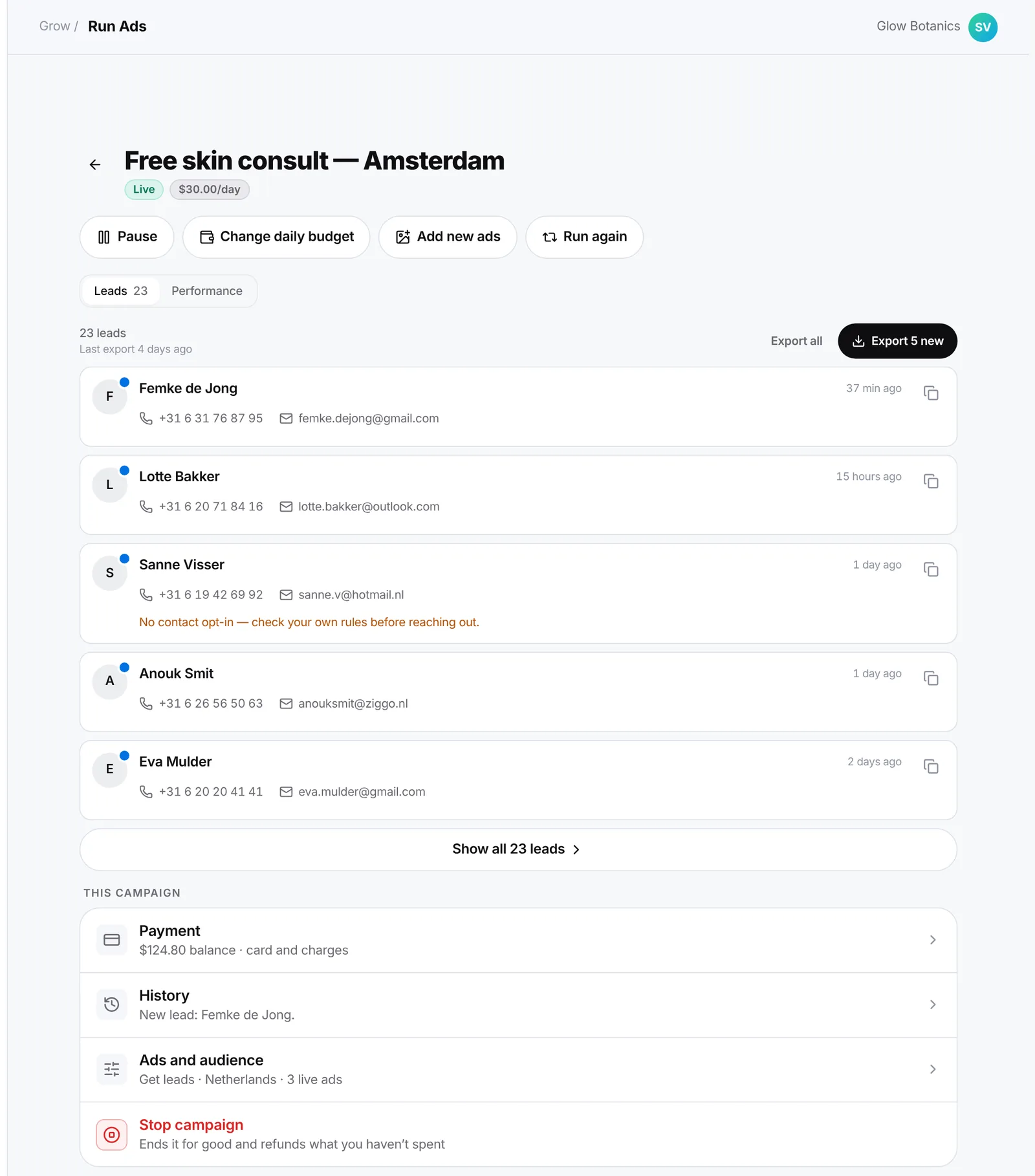
Every lead in one inbox
Lead campaigns that Mako runs collect a name, phone number and email. Each new lead is emailed to you within seconds and lands in a Leads inbox, where you can call or email them in one tap.
Export only the leads you haven't exported yet
Each lead is credited to the ad they came through
app.trymako.ai/run-ads
Run AdsNew
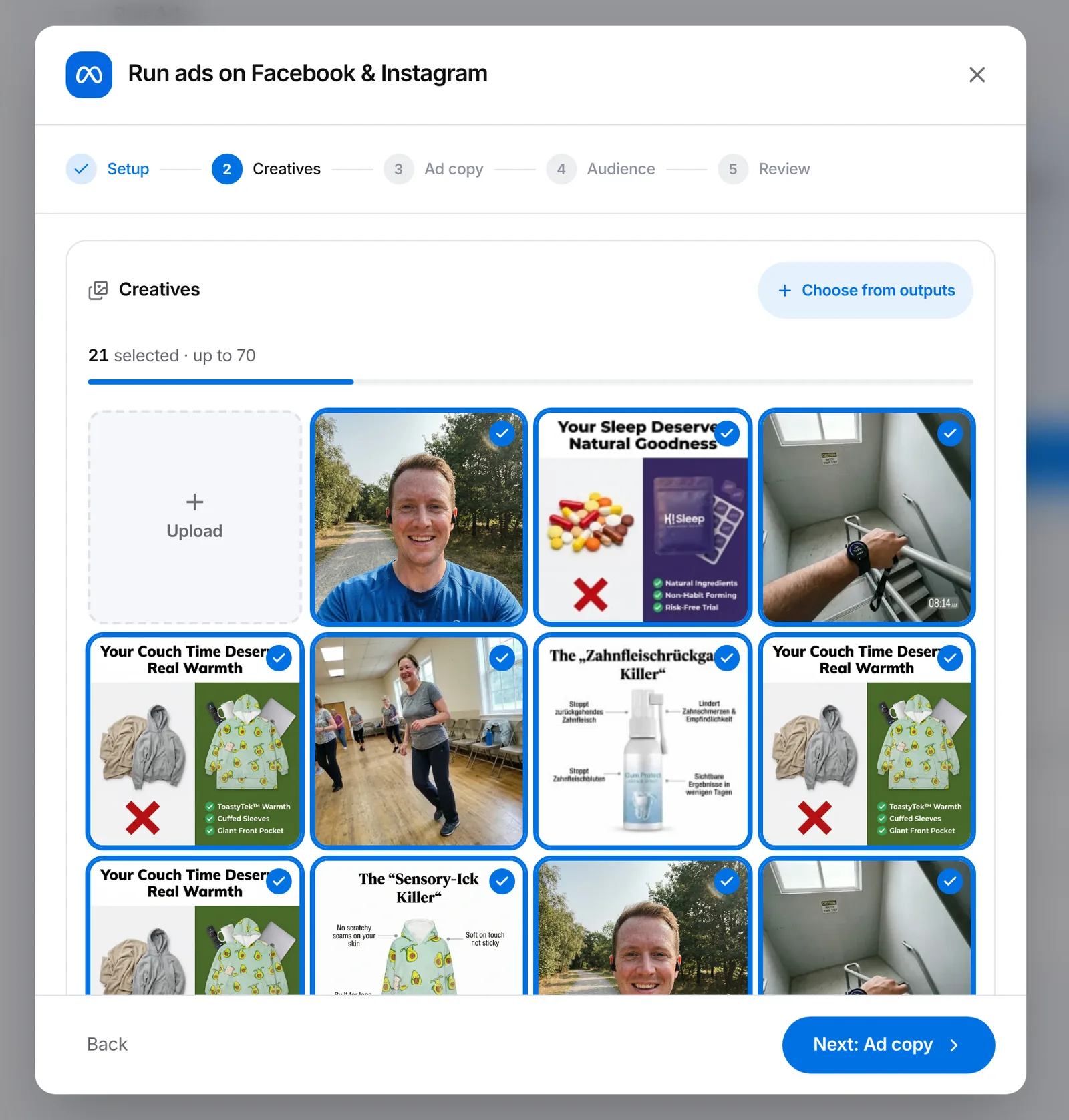
Launch up to 70 ads at once, with the ad copy already written
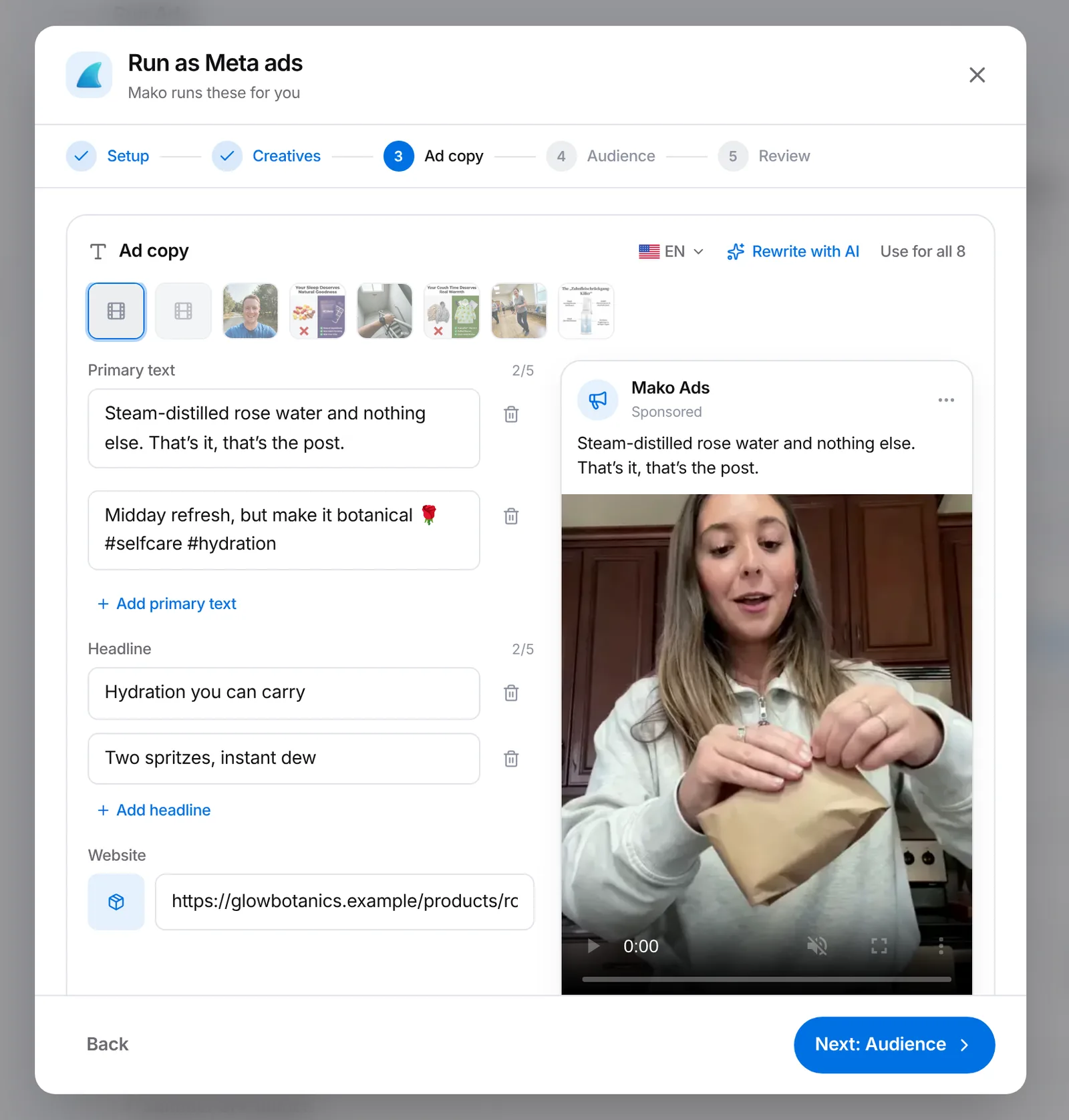
Pick your creatives and Mako splits them into ad sets and divides your budget. At the copy step the headlines and texts are already filled in, in your product's language, next to a live preview.
Ad copy no longer costs credits
Pick the language of the copy with one tap
app.trymako.ai/run-ads
app.trymako.ai/run-ads
SocialsNew
All your connections in one place
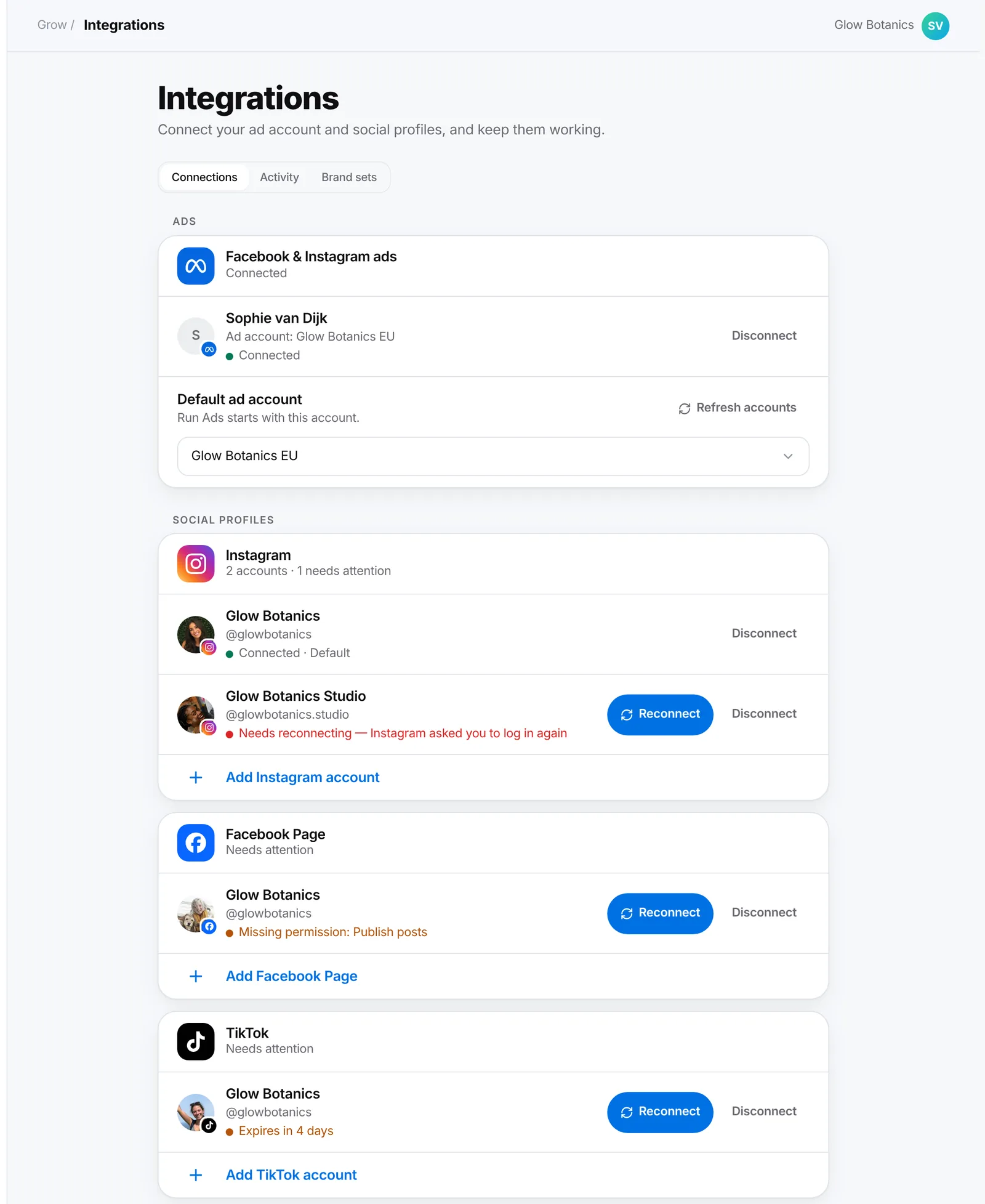
Integrations lists every ad account and social profile you've connected and which one is the default. It tells you when one needs reconnecting or is missing a permission, with a Reconnect button right there.
app.trymako.ai/integrations
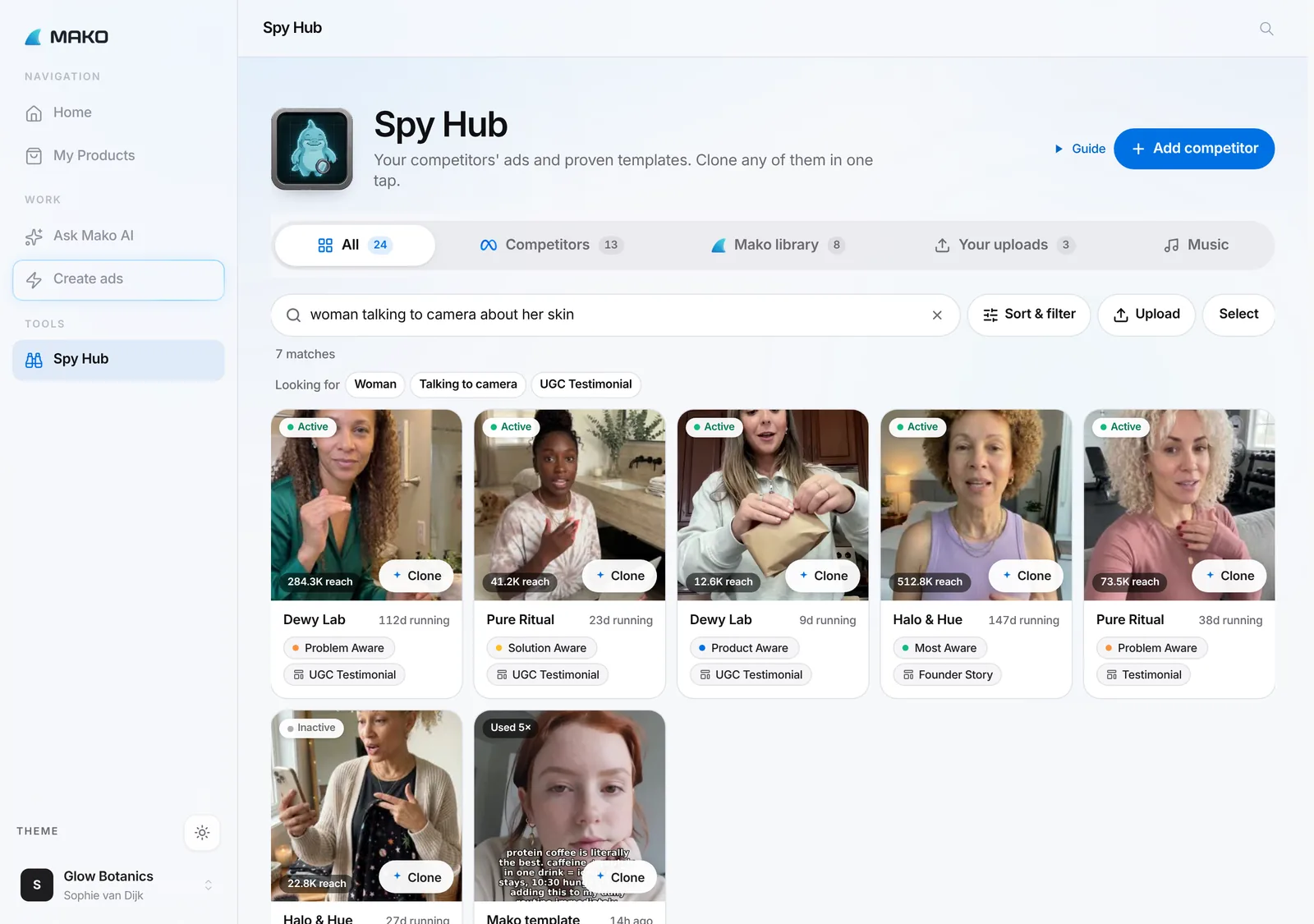
Spy HubNew
Spy Hub: describe the ad you're looking for
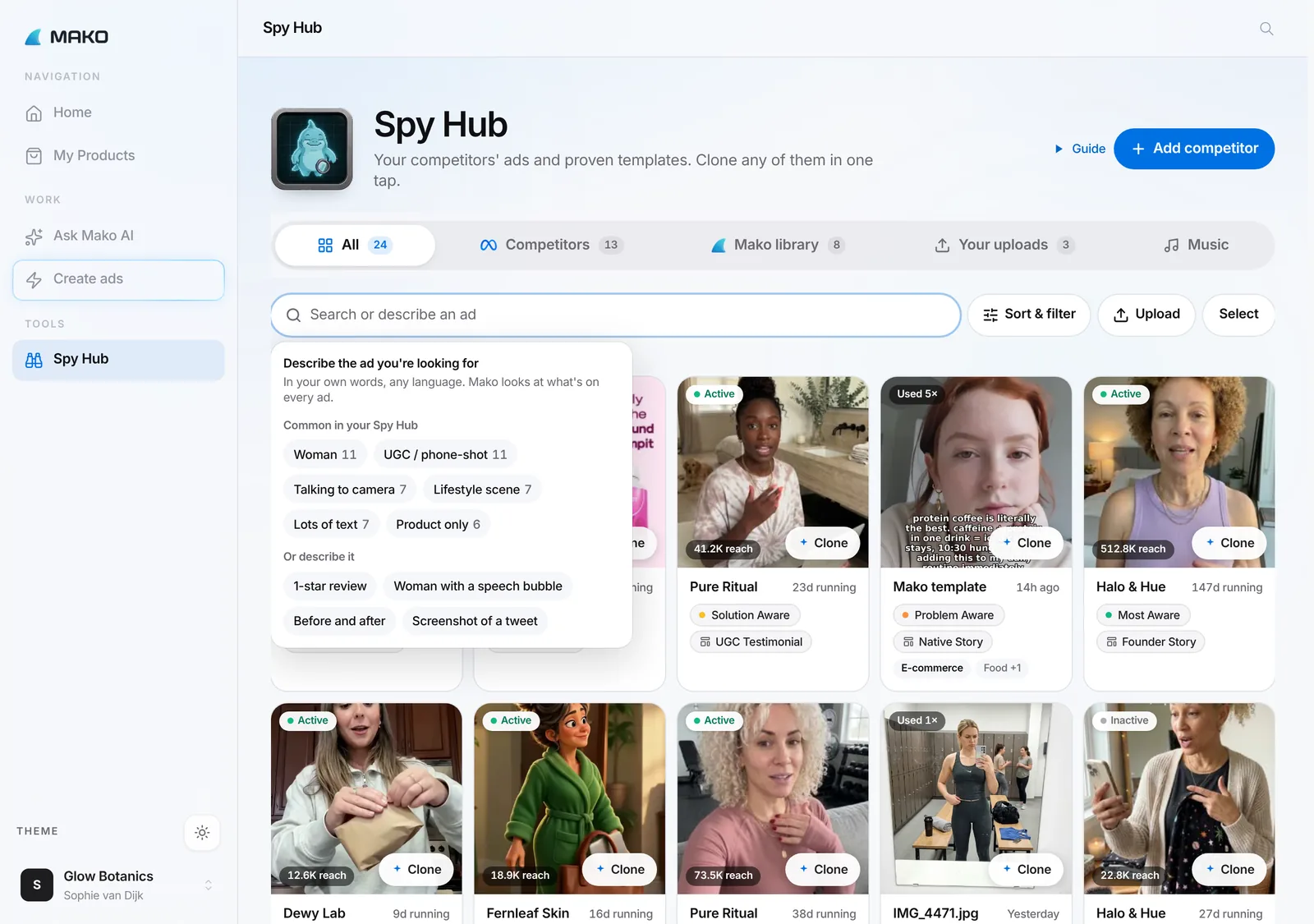
Search your competitors' ads the way you'd describe them, like "1-star review" or "woman with a speech bubble", then sort and filter across every ad.
Every ad opens in one clean detail card with arrows to browse
Add a competitor and their ads start showing within seconds
app.trymako.ai/spy-hub
app.trymako.ai/spy-hub
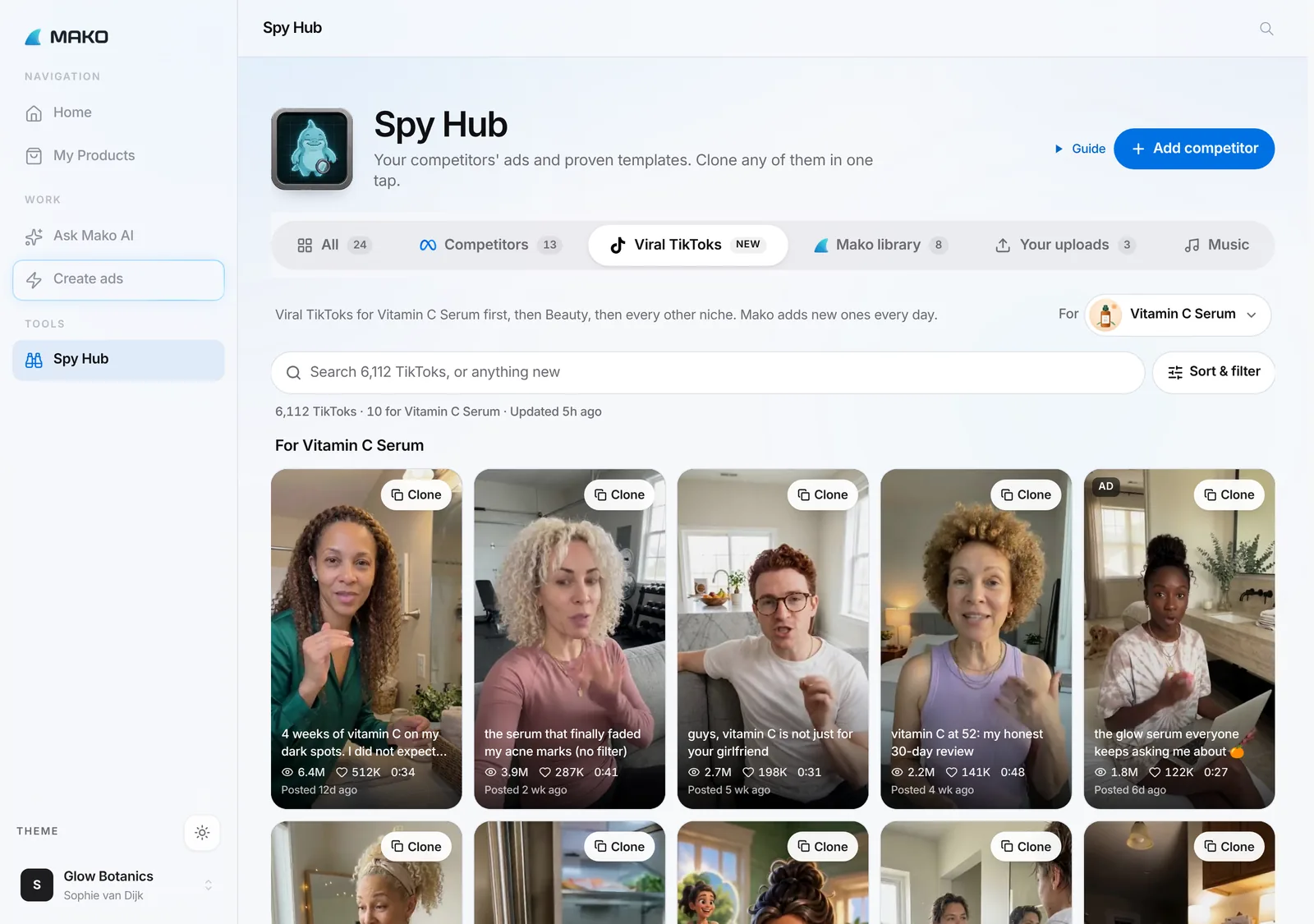
Spy HubNew
Viral TikToks in Spy Hub
A library of the most-viewed TikToks in all 25 niches, refreshed every day, with views, likes, comments and shares. Open it for a product and Mako searches TikTok for it by itself.
Hover to play, then clone any video for your product in one tap
Sort by most viewed, most liked or newest, organic or paid
app.trymako.ai/spy-hub
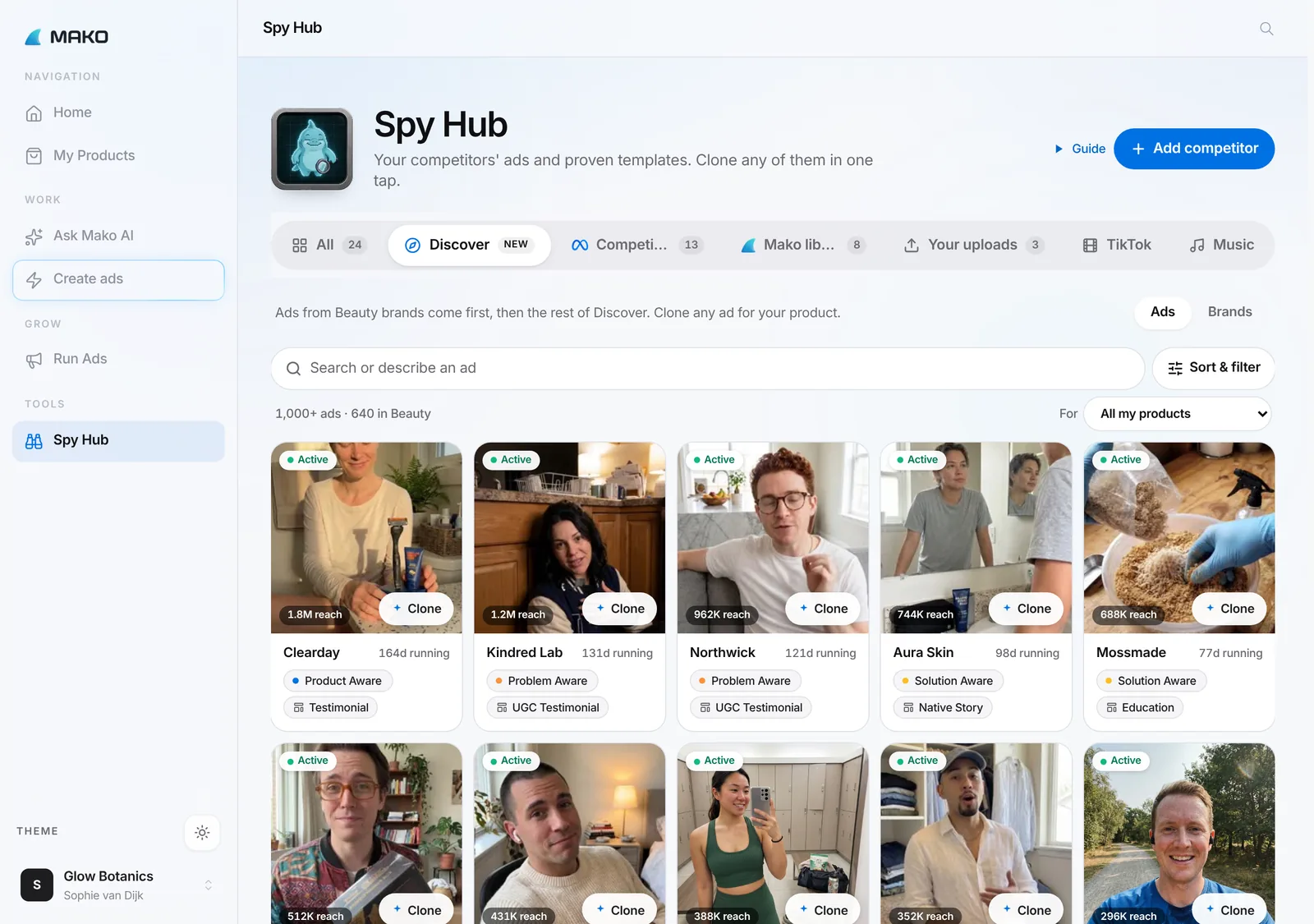
Spy HubNew
Discover: winning Meta ads from every niche
Browse real Meta ads from brands across Mako, ranked for your niche, and clone any of them in one tap.
Your own niches come first, without hiding the rest
Switch between ads and brands
app.trymako.ai/spy-hub
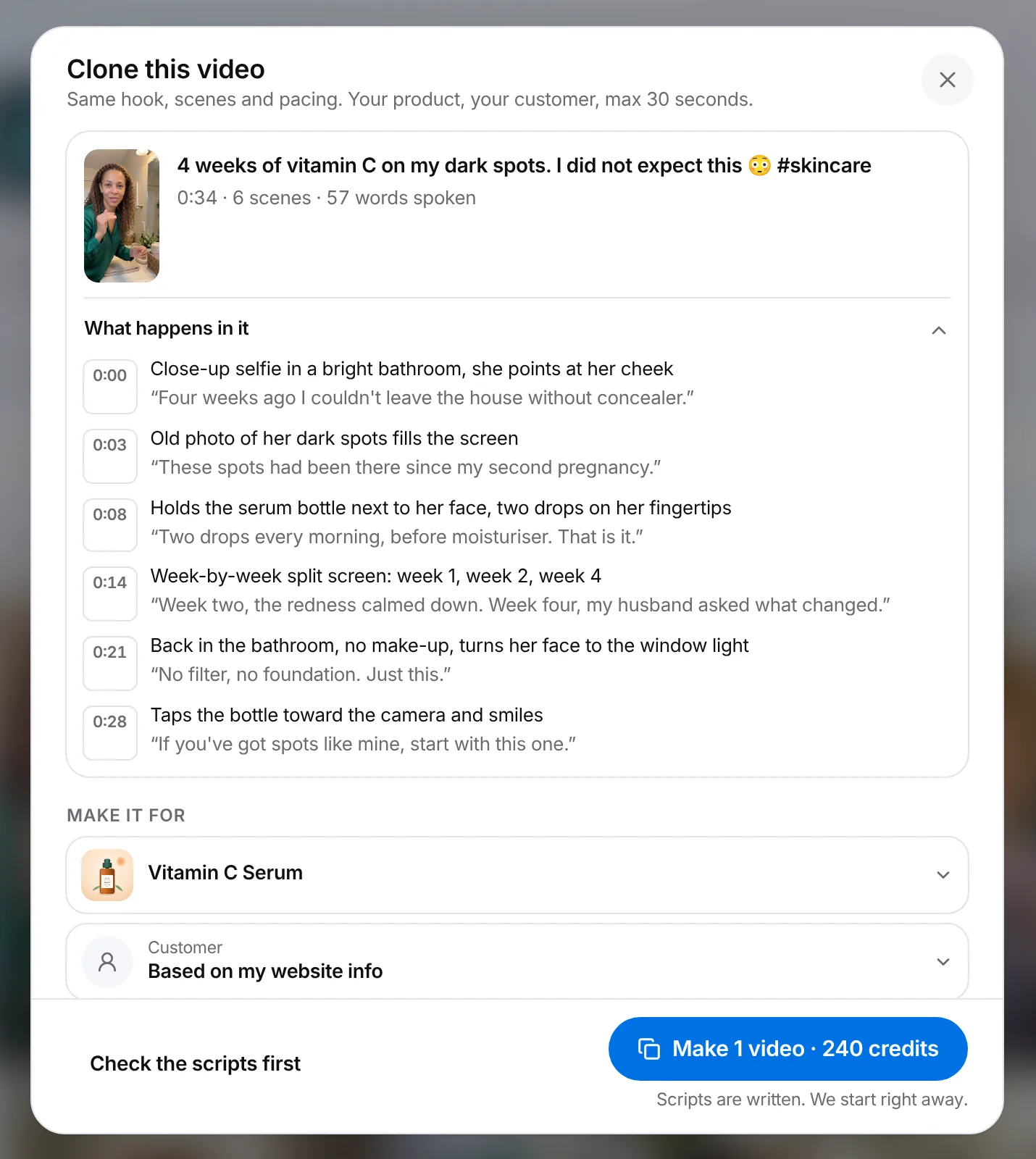
VideoNew
Clone a winning video ad
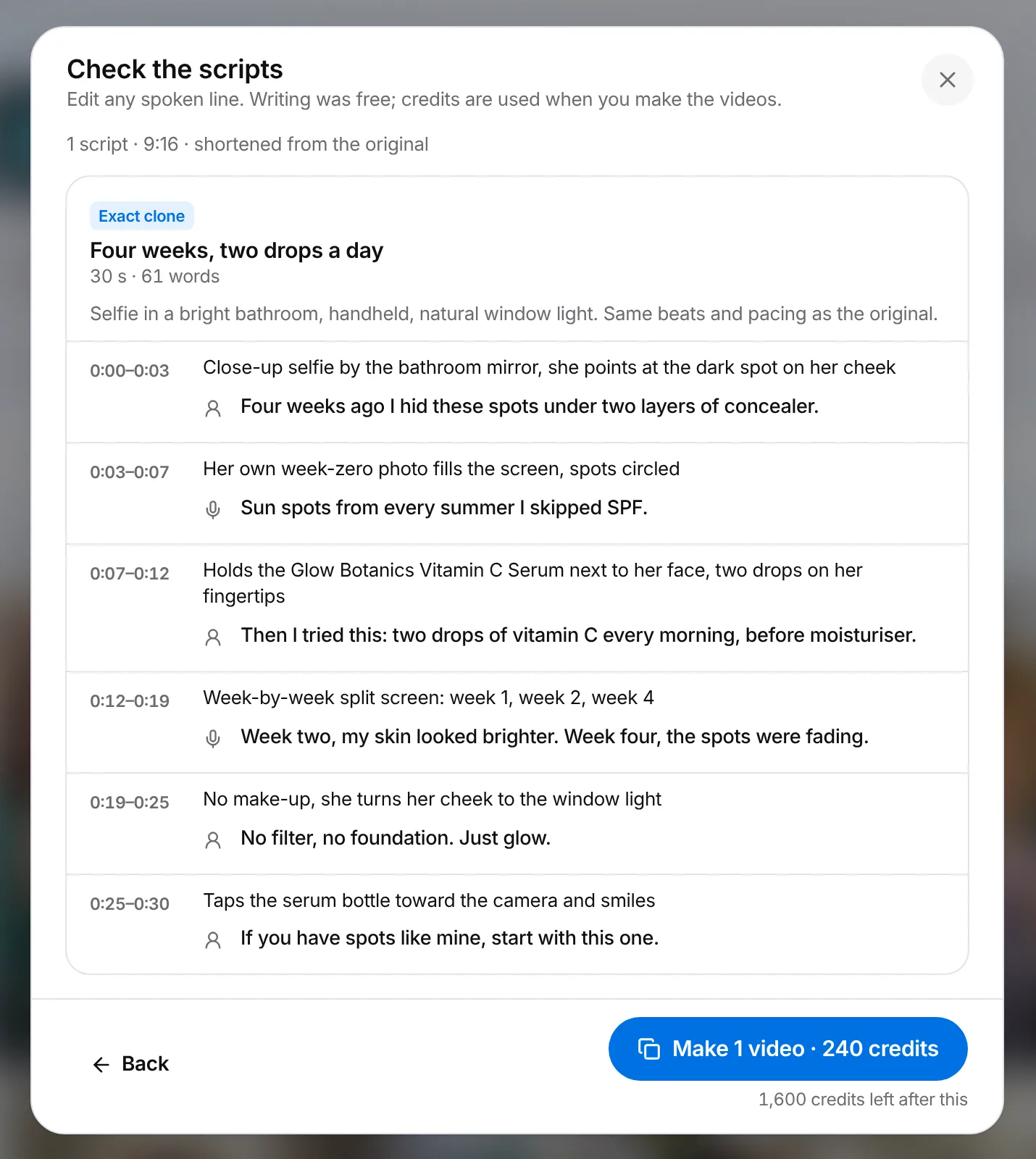
Pick a winning video from Spy Hub, a viral TikTok, your saved ads or a TikTok link. Mako reads it scene by scene and rewrites it beat for beat for your product, in the same order and style.
Make an exact clone, a new hook, a different angle or a 15-second cut
Check and edit the script first
The finished clone sits next to the original, with its views
app.trymako.ai/spy-hub
app.trymako.ai/spy-hub
VideoBetter
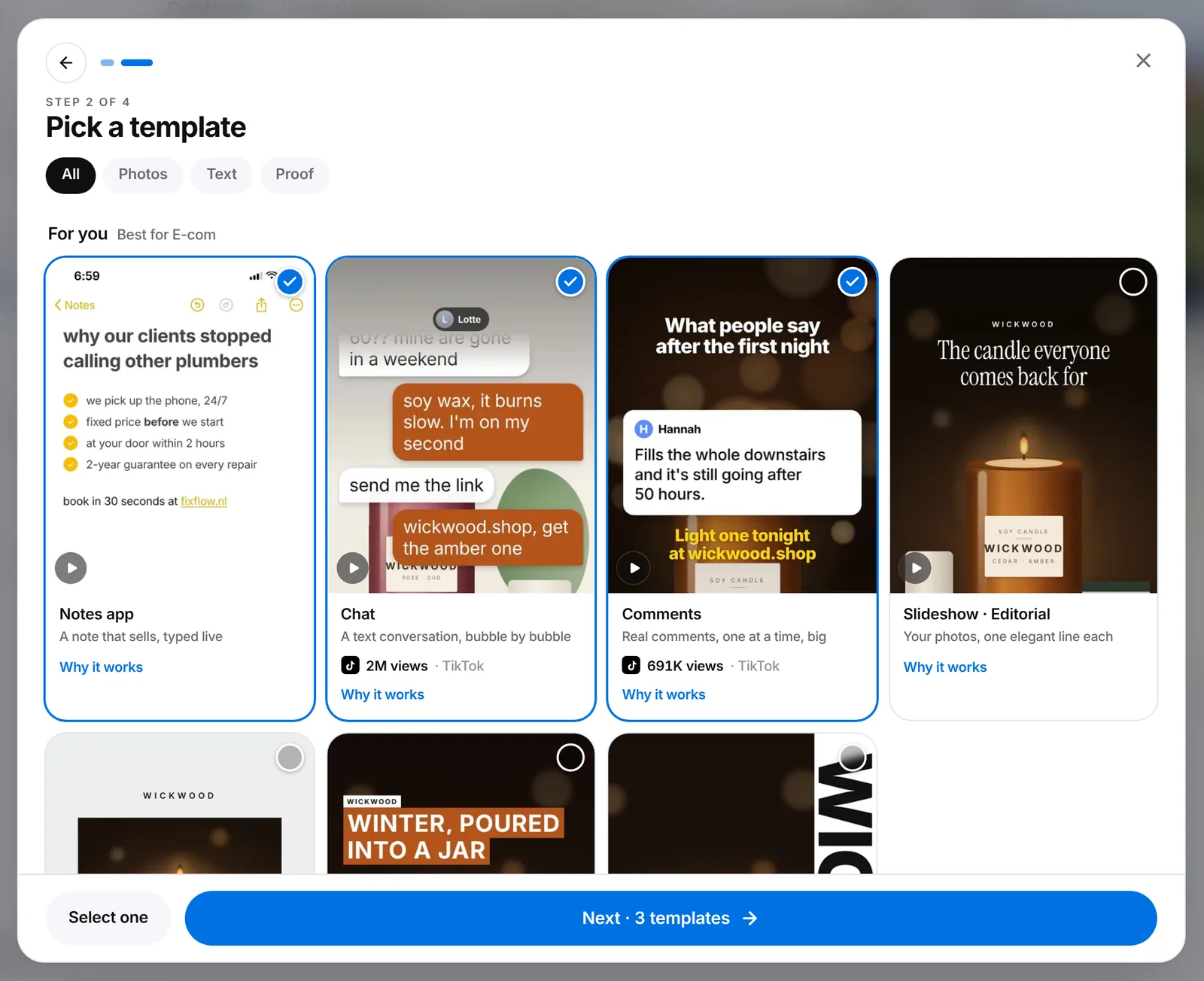
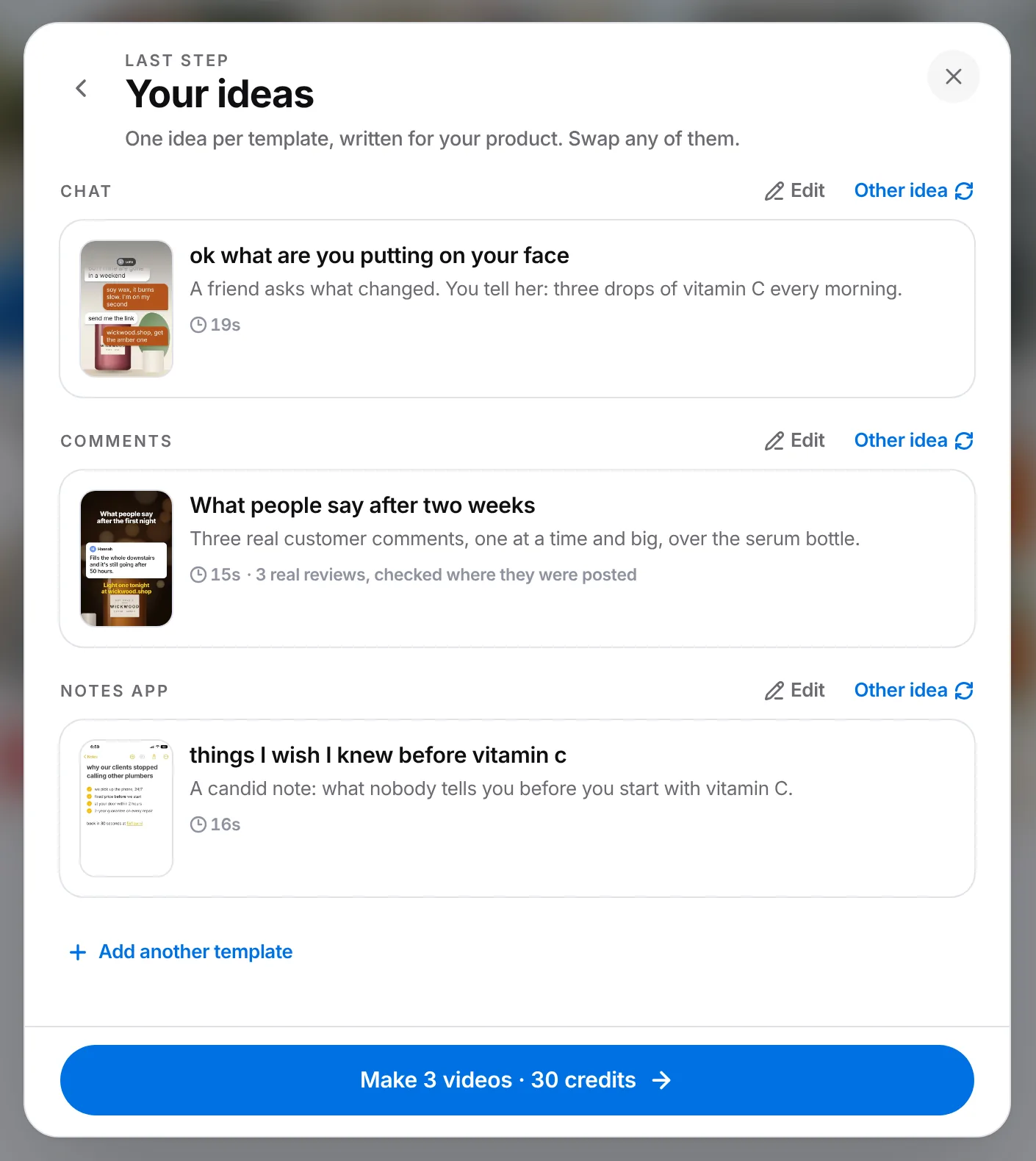
Video Templates: proven formats with your own images and music, for 10 credits
Pick up to 6 phone-screen formats at once, like Notes app, Chat, Comments or a Slideshow, each with proof of how well the original did. Mako writes one idea per template and makes them all in one go.
A template video now costs 10 credits, down from 20
Use your own photos, Brand Book or logo, and pick the music
Comment-style videos use real reviews from your website
app.trymako.ai/create
app.trymako.ai/create
VideoNew
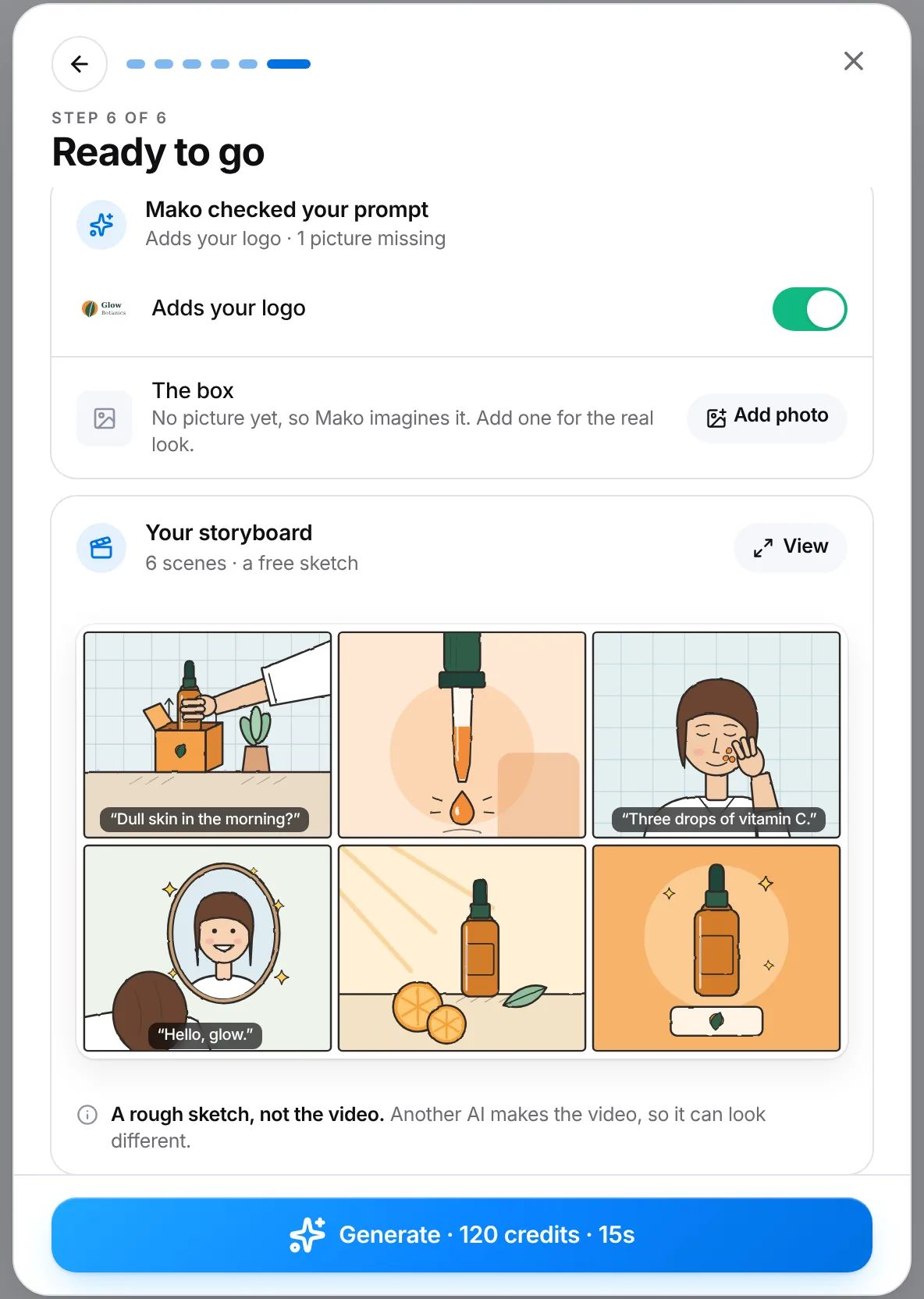
See a free storyboard before you pay for a video
Before you make a custom video, Mako sketches a 6-panel storyboard from your real product photos, with the spoken lines as captions, so you see the plan first. A storyboard never costs credits.
Mako checks your prompt against your photos, adds your logo and tells you which picture is still missing
You also see it on Ask Mako's approval card and for cloned videos
app.trymako.ai/create
Getting startedNew
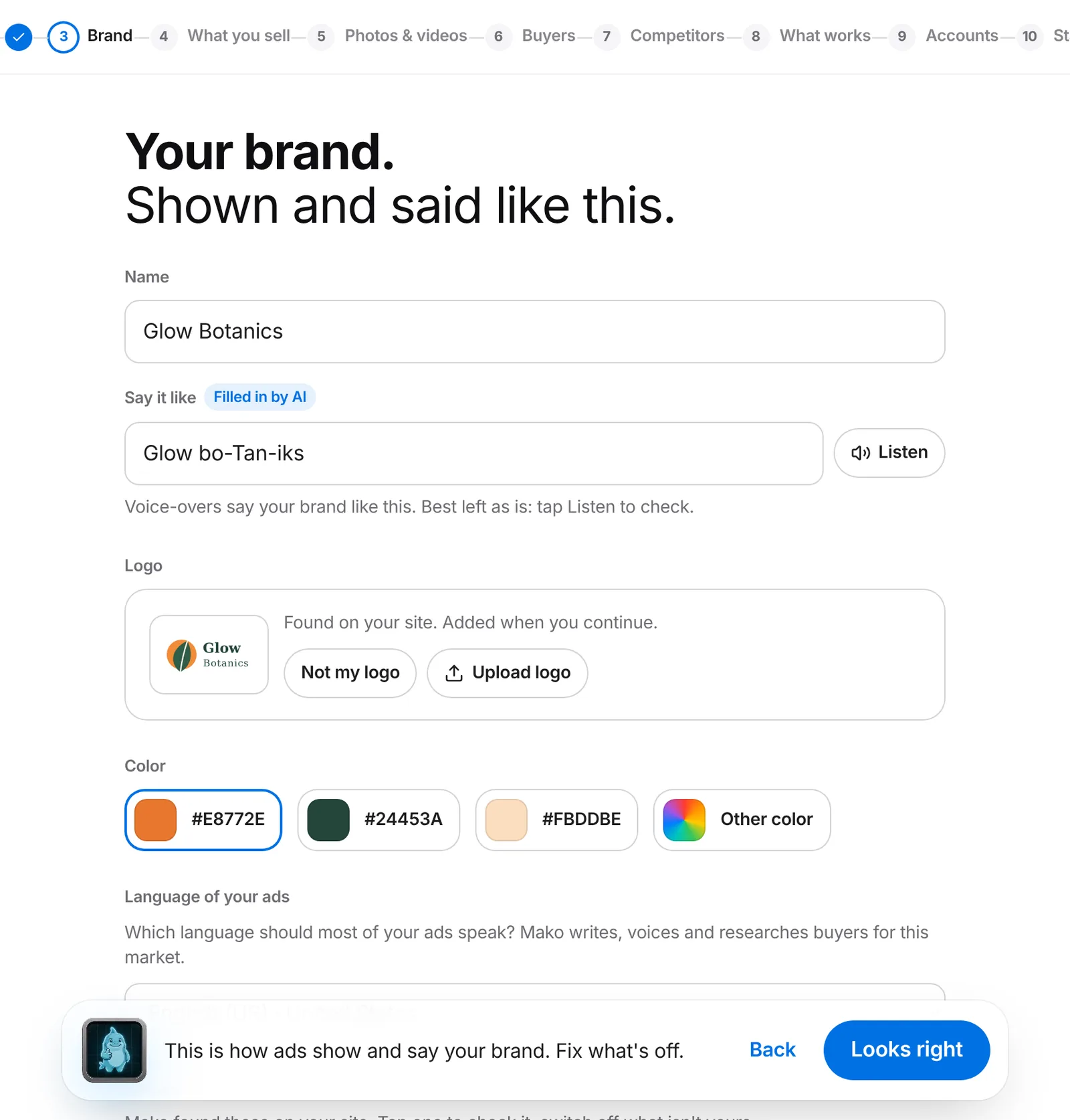
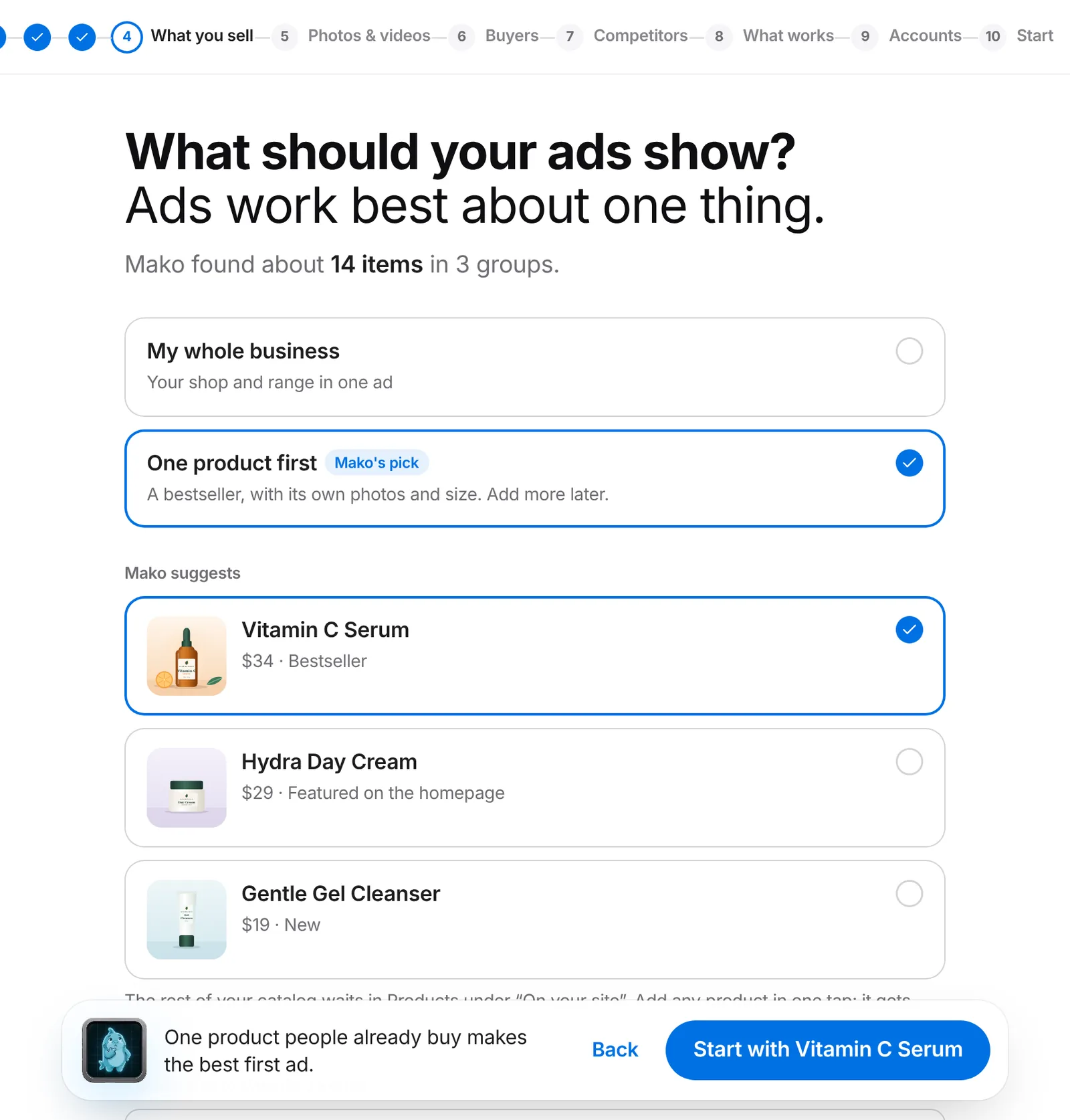
Setup with Mako: your product and brand right before your first ad
What you put in is what you get out. After you sign up, Mako reads your whole website and the web, then shows short screens it already filled in: your brand name and how to say it, logo, colours, products and real sizes, buyers and brands to learn from. Most of the time you just tap "Yes, that's right".
Your real product size and one logo go into every image and video
Buyer research reads at least 6 sites
Pick up where you left off any time; an unfinished setup never blocks you
app.trymako.ai/setup
app.trymako.ai/setup
VideoNew
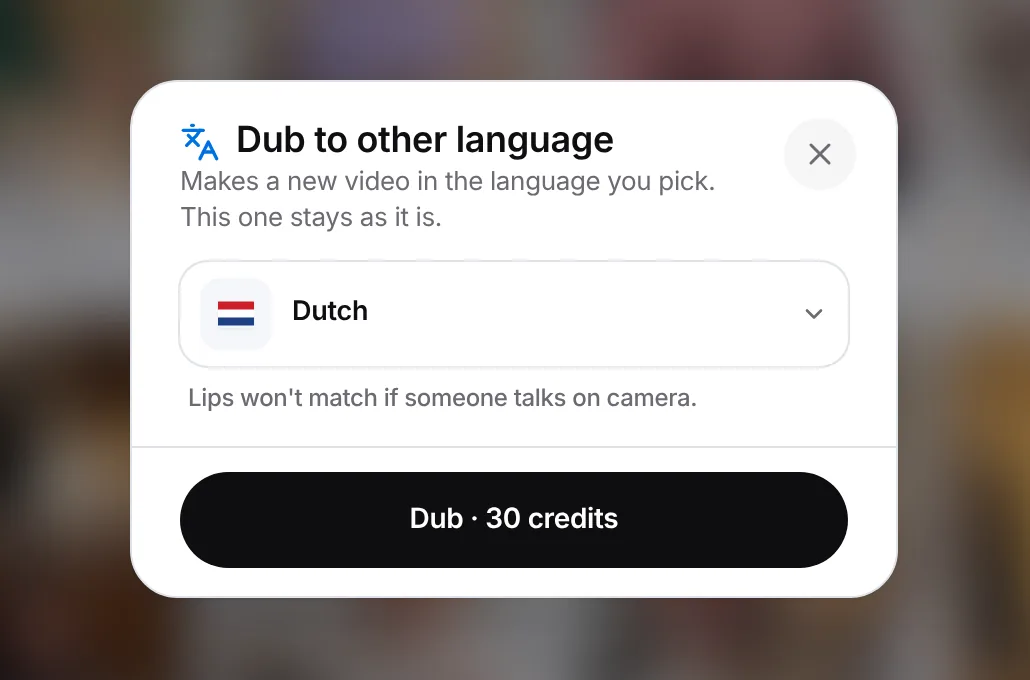
Your videos in 30+ languages, at any speed
Make a Custom video in another language from the start, or dub a finished video into a new language with a new voice. Your original stays as it is.
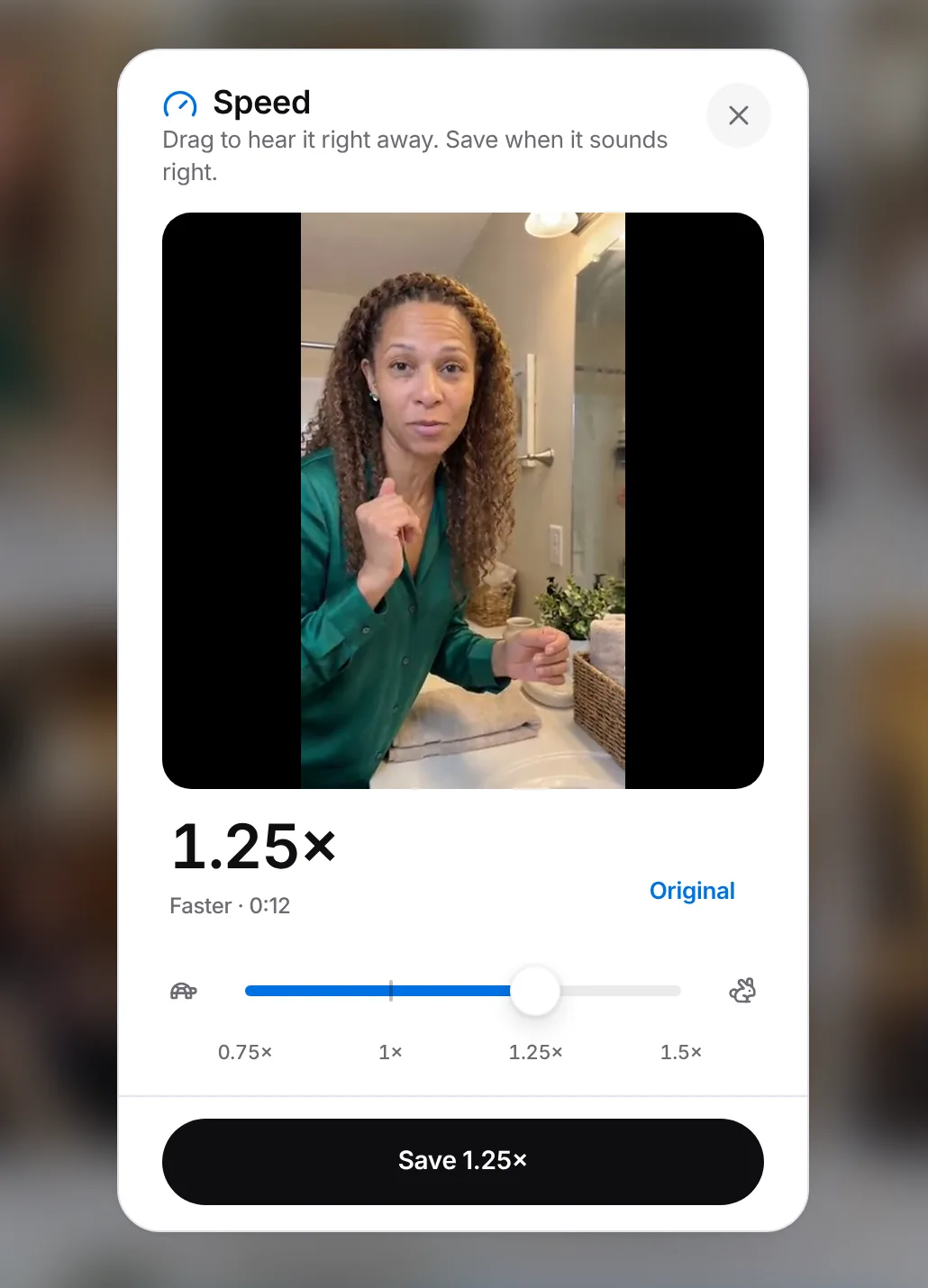
Speed control: make any finished video faster or slower with a live preview, and save it for free
app.trymako.ai/create
app.trymako.ai/create
VideoBetter
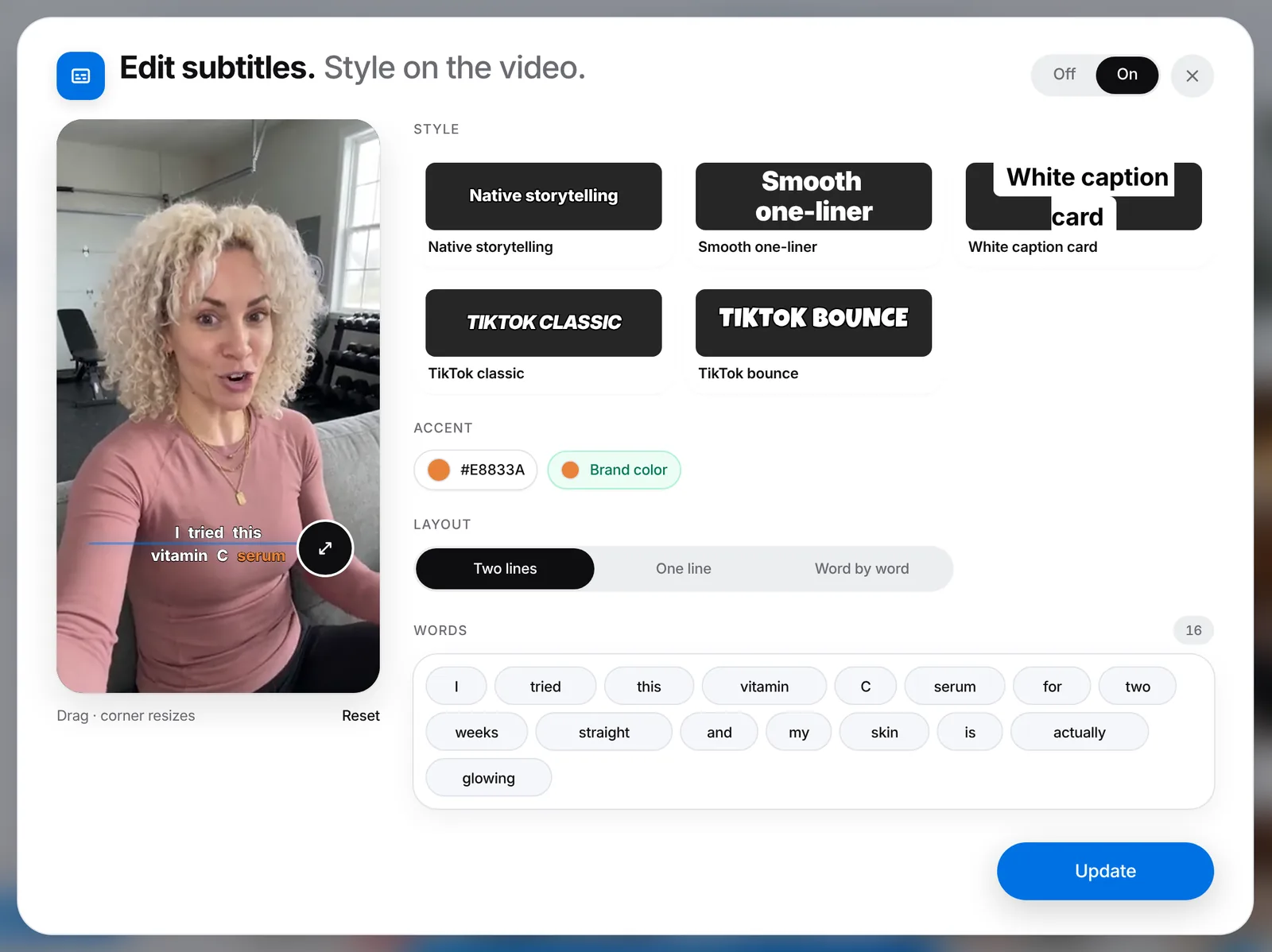
Subtitles that follow every word
Word-by-word subtitles light up exactly when each word is spoken, follow the language that's really spoken, spell your brand name right and stay readable in your brand color.
Words you fix stay fixed, even after a speed change
No subtitles in the pauses
app.trymako.ai/create
Create adsNew
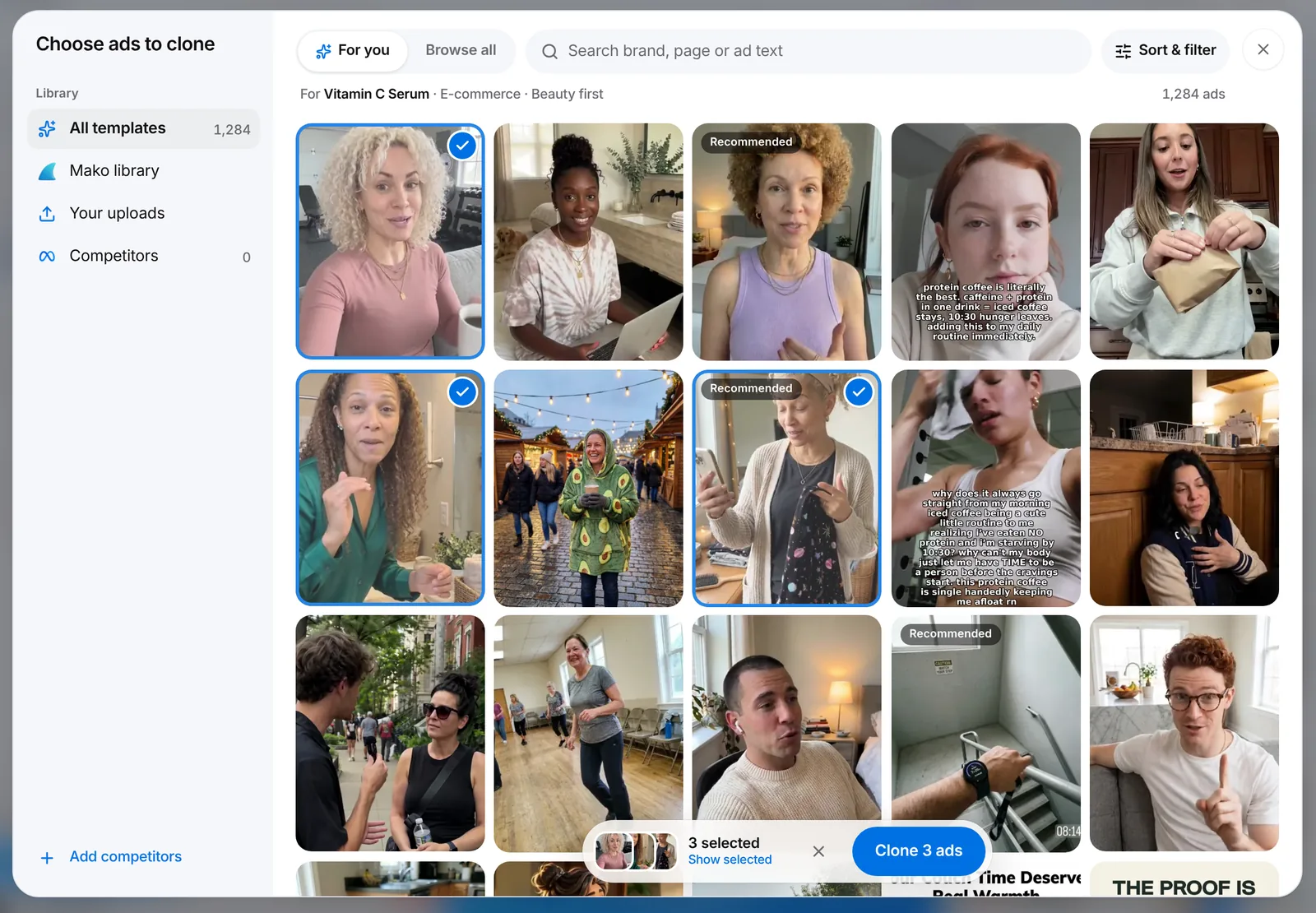
Templates that fit your business
Cloning ads now starts with templates picked for what you sell, in a cleaner picker that always shows the ads you've picked.
app.trymako.ai/create
Create adsNew
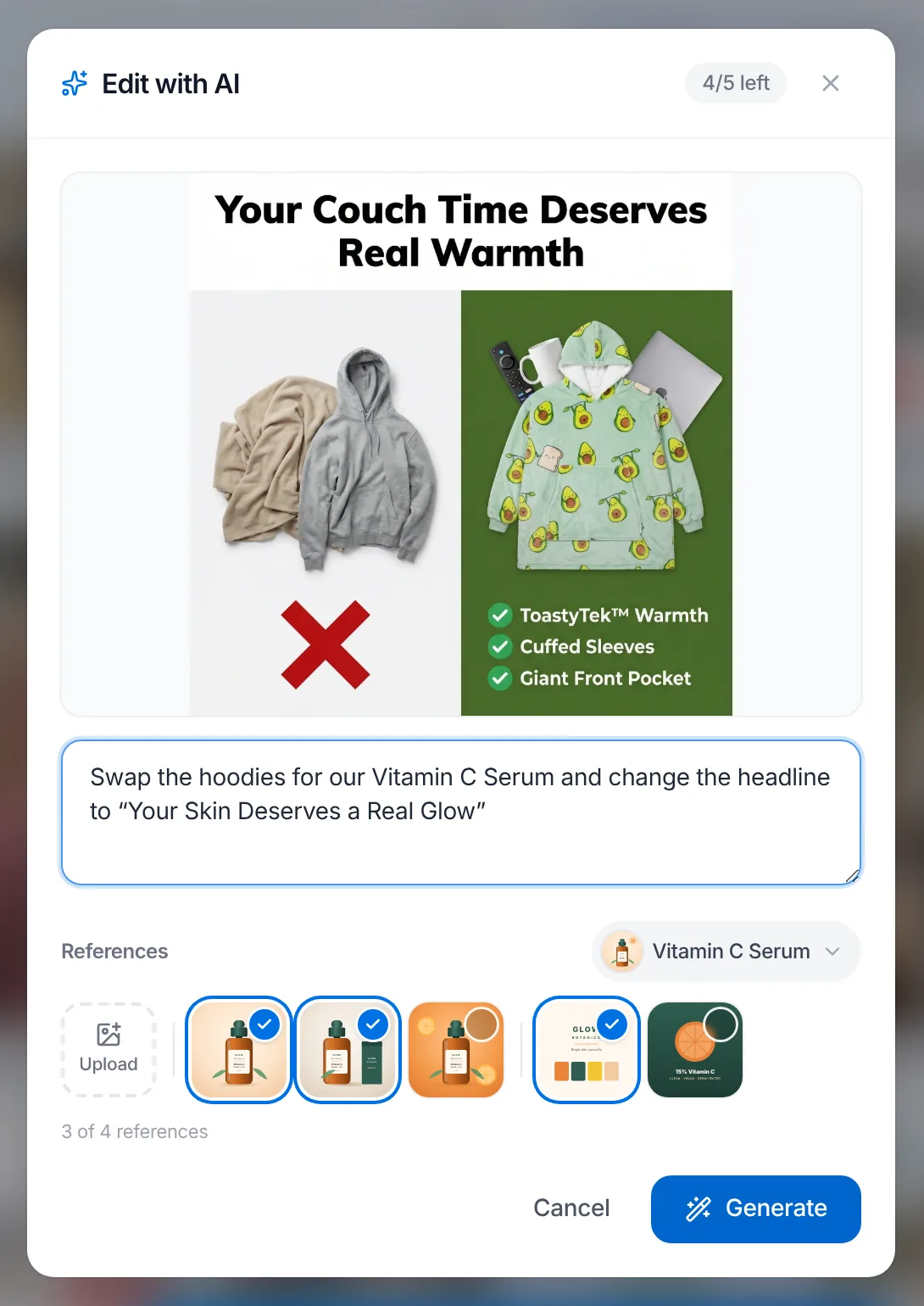
Edit with AI, with your own product photos
In Edit with AI, pick up to 4 references straight from your saved product photos and Brand Book, so the edit looks like your real product.
Edit with AI now also works on translated ads
app.trymako.ai/create
Create adsBetter
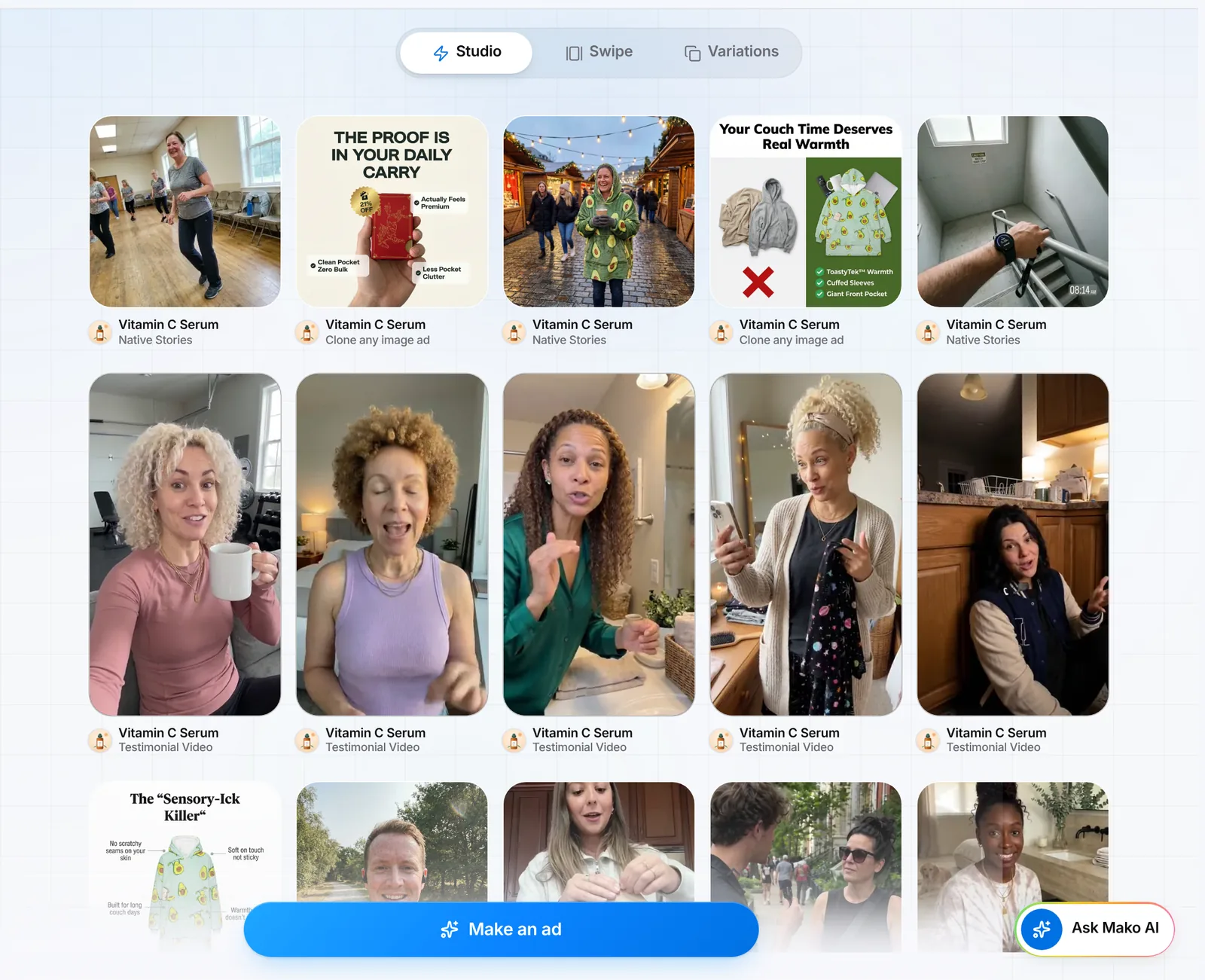
A calmer, cleaner Mako
A fresh look across the app, with a Studio · Swipe · Variations switcher at the top of Create ads and one product picker for all three.
app.trymako.ai/create
Ask MakoNew
Use Mako inside Claude and ChatGPT
Add Mako in three steps, then ask for ads, check your results and launch campaigns right from that chat.
VideoNew
Edit a video with AI
Pick a part of your video, say what to change, and Mako re-makes just that part as a new version. Switch between versions any time.
Create adsNew
Slideshows
Make up to 20 swipeable photo slideshows at once, edit every word for free, and post them to Instagram, Facebook and TikTok.
My ProductsNew
Watch Mako research your buyers
While Mako studies your market, you see the real web pages it reads, live. When it's done, the research is saved as a report card you can read in full and use in Create ads.
Create adsBetter
Made for your phone
Download saves straight to Photos on iPhone and iPad, selecting works like Photos, and Mako keeps working when you switch apps or lock your screen.
Getting startedBetter
Mako speaks your business, not only webshops
Services, apps and studios now get questions, forms and wording that fit them: a rental company sees bookings, an app sees sign-ups.
My ProductsBetter
Up to 10 photos per product
Save up to 10 photos per product, up from 5. Mako uses all of them when it makes your ads and videos.
Every change. Sorted by impact.
All 240 fixes and improvements since August 7, biggest first in every part of Mako.
Run Ads & Meta ads55 changes
Better
Manage every campaign from one page in Run Ads: pause or resume, change the daily budget, add new ads, or run an ended campaign again.
New
Run Ads is here: let Mako run your Facebook and Instagram ads on its own ad account, without connecting your own Meta account.
New
Let Mako run your Meta ads: pick your ads, goal, audience and daily budget, and Mako runs them, no Meta ad account of your own needed.
New
Run Ads now asks what your ads should bring in and picks the goal that fits your business: Bookings, Sign-ups, App users, Sales or Awareness.
New
Launch up to 70 creatives at once on your own Meta account; Mako splits them into ad sets and divides your budget for you.
New
See every lead from your Let Mako run it campaigns in one Leads inbox, call or email them in one tap, and export only the new ones.
New
Turn any single ad on or off with a switch inside Run Ads, both for campaigns Mako runs and on your own Meta account.
Better
Meta ad setup is calmer: less text, a feed preview that plays your video, a website per ad, and ad copy that no longer costs credits.
New
Add new ads to a campaign Mako is already running, at no extra charge; they're tested on the same audience and budget.
Better
Running Meta ads is simpler: one chooser everywhere, one-tap Meta connect, auto-filled campaign names, and the exact video you see in Studio.
New
Ad copy now writes itself: when you reach the copy step in Run Ads or Post to socials, Mako fills in any missing text and headlines.
New
Run Ads now shows how your Meta ads are doing right inside Mako: spend, impressions, clicks, reach and conversions.
New
Meta ads have a new Traffic goal for when you just want more website visitors, plus a short line under each goal saying when to pick it.
New
See how your Mako-run campaigns perform (money spent, clicks, results and cost per result) and pause, change the budget or cancel any time.
New
Mako-run lead campaigns now collect name, phone and email, email you each new lead within seconds, and list every lead on the campaign page.
New
Choose the language of your AI-written ad copy with a small flag button; it starts in your product's own language.
Better
With Let Mako run it, you're only charged once Meta can build your ads, and your money comes back automatically if Meta refuses.
Better
If your card fails, campaigns Mako runs for you keep going on the budget you already paid, and fixing your card is one click from the email.
Better
Run Ads campaigns now show their daily budget, list every ad with a preview, and count results the same way Meta Ads Manager does.
Better
Big campaigns in Run Ads now show their numbers in seconds, and tapping an ad opens it inside Mako without a Facebook cookie pop-up.
New
Run Ads and Post to Socials now have their own pages in the menu, on desktop and in the phone tab bar.
Better
Before you pay for a campaign Mako runs, your ad is now checked with Meta first, so any problem shows on the Review step and nothing is charged.
Better
Campaigns Mako runs for you are now easy to find again: in Activity, at the top of Integrations, and via a Campaigns button in Studio.
Better
You can now add or change the card for ads Mako runs right where you pay, on the Review step, and later in the campaign's Money tab.
New
When you choose Run as Meta ads, you can now pick: let Mako run the ads for you, or run them on your own Meta ad account.
Better
Running a video as a Meta ad now opens with the ad text already written, next to a live preview of how it will look in the feed.
Better
Setting up ads Mako runs for you is quicker: age, gender, country, campaign name and website now come pre-filled with recommended answers.
Fixed
Launching video ads to Meta no longer fails over a missing thumbnail: Mako now uses the thumbnail Meta creates for your video.
New
A new Money tab on Mako-run campaigns shows every charge and refund, your balance, your next charge and where your money went.
Better
If Meta rejects your ads, Mako now stops the campaign within about half an hour, refunds what's unspent and tells you why in Meta's words.
Better
Mako-run campaigns now come with a monthly statement, and a campaign Meta doesn't deliver stops being topped up after 7 days.
Better
In Run Ads, Native Story ads now run on their long story with a headline, and "Generate all with AI" fills in missing headlines on any ad.
Fixed
Cancelling a Let Mako run it campaign now shows the refund you'll actually get after today's ad spend, not your full balance.
Better
People who tap one of your Let Mako run it ads now land on a page showing that exact ad, not the campaign's first one.
Better
Leads campaigns run by Mako now show the same lead count everywhere, and each lead is credited to the ad the person came through.
Better
The 'My Meta account' ad copy step now matches Let Mako run it: text on the left, a live feed preview on the right, and fewer explanation walls.
Better
After paying to launch with Let Mako run it, you can close right away; Mako emails you when your ads are live, no more waiting on a spinner.
Fixed
If Meta refuses your Let Mako run it ads, you now see Meta's own reason, and video-only launches are checked before your card is charged.
Better
Reopening a campaign in Run Ads shows its numbers instantly, and when Meta is busy you see the last known numbers instead of an error.
Fixed
Reconnecting Meta no longer shows a false 'Meta did not stay connected' error when the connection actually worked.
Fixed
Ad videos now play inside Run Ads, every ad row opens when tapped, and Post to socials shows real thumbnails and profile pictures again.
Fixed
If your Meta connection has expired, Run Ads and Integrations now tell you and offer a Reconnect Meta button instead of a vague error.
Fixed
Letting Mako run your ads is smoother: your Studio creatives show up, the payment step stays open, and drafts can be resumed or discarded.
Better
Traffic campaigns Mako runs now aim for people who actually reach your page, not just quick taps, and report landing page views.
Fixed
Meta ads with several text options are no longer refused by Meta at launch.
Better
Run as Meta ads now shows the website link your ads will send people to, and fills in ad text you already wrote in Create ads.
Better
Adding extra headlines or ad texts no longer blocks the Leads goal, and Mako remembers your Page, Instagram account and button per ad account.
Fixed
If Meta pauses your ad account, Mako now says so plainly and gives you a button to open Ads Manager and confirm it.
Better
Run as Meta ads now remembers your Facebook Page and Instagram account, and 'Generate with AI' writes copy about the right product.
Better
When Mako runs your ads, you can add a card right in the setup, pick the button text on your ad, and your lead form names your business.
Better
"Run as Meta ads" in the Studio menu now always lets you choose between Let Mako run it and your own Meta account.
Fixed
Pages you open from the menu now start at the top instead of halfway down, and Run Ads and Post to socials get proper space under the header.
Fixed
Starting a new Let Mako run it campaign no longer pre-ticks a creative you didn't choose.
Fixed
Running ads in the EU no longer wrongly says 'Meta has no approved advertiser' and blocks Launch after you re-pick your ad account.
Fixed
On a campaign that needs attention, Cancel & refund now opens the refund screen right away, and the time shown is when the problem started.
Ask Mako18 changes
New
Run Meta ads and post to Facebook or Instagram straight from Ask Mako: it fills in the details and shows one clear card with the cost first.
New
Ask Mako now does the work: it plans and launches ads and videos, and asks your OK before spending credits.
New
Ask Mako can now find any of your Meta ad accounts by name, compare your ads over any period, and watch a video ad to explain why it works.
New
Ask Mako can turn your best Facebook and Instagram ads into new image or video variations, including carousels and boosted posts.
New
Ask Mako can now check, pause, resume, re-budget, cancel and launch campaigns Mako runs for you, and always asks first when money is involved.
New
Ask Mako can now launch your Meta ads and schedule social posts: it drafts a plan, asks only what's missing, then waits for you to tap Allow.
Fixed
On iPhone, locking the screen or switching apps while Ask Mako works no longer shows "Load failed"; the reply is waiting when you come back.
iPhone
Better
Ask Mako now gives real ad counts, never asks you to approve something that would fail, and its approval cards show what they'll make.
Better
In Ask Mako, tap any ad in the gallery to watch it, missing headlines are written for you, and 'View your campaign' follows each launch.
Better
Ask Mako can now pause or resume a single ad, add ads to your campaign, and post to your linked Instagram and Facebook after you tap Allow.
Fixed
Ask Mako no longer stops replying in the middle of a sentence; if a reply does get cut off, it says so and you can tap Continue.
Fixed
Attaching an SVG logo, an iPhone photo or lots of large photos no longer breaks an Ask Mako chat; Mako now sees them and answers.
Fixed
Asking Ask Mako for Testimonial video ideas now works instead of failing with 'Couldn't write ideas just now'.
New
Scrolled up in Ask Mako while it's still replying? A 'new messages' button now lets you jump straight to the latest.
Fixed
Ask Mako no longer gets stuck on the old chat screen after you sign in, or when you use Safari or strict privacy settings.
Fixed
Running out of credits inside Ask Mako now shows upgrade and buy-credits options instead of an empty popup.
Fixed
On your phone, tapping a link in an Ask Mako reply now tucks the chat away so you actually see the page it opens.
Phone
Better
Hiding the Ask Mako panel is clearer: one simple arrow in the top bar closes it, and the extra plus button is gone.
Post to socials & Integrations16 changes
New
Use Mako in Claude and ChatGPT: add Mako in three steps, then ask for ads, check results and launch campaigns right from that chat.
New
Connect your TikTok profile and post or schedule videos straight from Post to socials.
New
Edit, reschedule, retry or remove any post in Post to socials, and see everything you've planned in a new calendar view.
Better
Integrations now lists every connected account with its status, and tells you when one needs reconnecting or is missing a permission.
New
See how your posts are doing in one Results view for Instagram, Facebook and TikTok: followers, likes, comments, views and a chart.
Better
Captions in Post to socials are now free, and "Generate all with AI" writes copy for all your creatives at once instead of three at a time.
Better
Results in Post to socials now load instantly, let you pick a single account, and no longer show a "Reconnect" row for every Facebook Page.
Better
Post to socials now opens on your own posts, with separate Socials and Meta Ads tabs and an 'Open on Instagram/Facebook' link per post.
Better
Post to socials now sits in the Create ads header, lists every Instagram account and Facebook Page you connect, and no longer crashes on Publish.
Better
Once your captions are written, 'Rewrite all with AI' stays available in Post to socials and asks before replacing your text.
Better
Posting to TikTok is simpler: one 'Who can see this?' dropdown, extra options tucked away, and a clear note if your account must be private.
New
See your TikTok followers, likes and per-video views in Post to socials, and ask Ask Mako what works on your TikTok.
Better
Tapping Post to Instagram or Facebook now starts with that account picked, new posts appear in your list right away, and thumbnails load faster.
Better
Post to socials now counts every post correctly (6 ads on 2 channels = 12 posts) and lets you set a different time for each post.
Fixed
'Generate with AI' in Post to socials now writes your caption, and you can upload your own files or pick from your outputs with clear previews.
Better
If a post fails because a connection expired, tap Reconnect on that post in Activity and Mako retries the same post automatically.
Create ads47 changes
New
New: Slideshows. Make up to 20 swipeable photo slideshows at once, edit every word for free, and post them to Instagram, Facebook and TikTok.
Better
Picking ads to clone now starts with templates that fit your business, in a cleaner picker that always shows the ads you've picked.
New
On iPhone and iPad, Download now saves your videos and images straight to Photos instead of the Files app.
iPhone
Better
A fresh look across Mako, plus a Studio · Swipe · Variations switcher at the top of Create ads with one product picker for all three.
Fixed
On phones and tablets, 24 buttons that only showed up on mouse-hover, like delete, remove and Edit with AI, are now always there to tap.
Phone
New
In Edit with AI, pick up to 4 reference images straight from your saved product photos and Brand Book.
Better
If your phone locks or you switch apps while Mako is working, the action now finishes when you come back, without errors or double charges.
Phone
Better
Select mode in Create ads works like Photos: a Save button on phones, and on desktop and iPad the top bar turns into the selection toolbar.
Better
Create ads has a new Quality choice (Good, Excellent or Extreme) with the credit cost shown for each.
Better
Ideas for you in Custom video is easier to use: tap an idea to select it, then press Continue, so you never start one by accident.
Better
Selecting ads on your iPhone now works like Photos: Cancel and Select All at the top, Post and Ads buttons at the bottom.
iPhone
Better
Create ads feels smoother: swipe between ads in the full-screen viewer, swipe down to close, and undo a deleted ad within 10 seconds.
Fixed
Fixed a problem where every image batch in Studio failed with an error; images, retries and Native Stories render normally again.
Fixed
"Edit with AI" now works on translated ads, and the edited version replaces the translated one.
Fixed
Your ads in Create ads now appear in the order they were made, and tiles no longer jump around while ads generate or load.
Fixed
Translated ads now keep the original shape (a 9:16 story stays 9:16) instead of always coming back as a square.
Fixed
A cancelled image generation now stays cancelled instead of coming back a few seconds later, and your credits are returned once.
Fixed
On phones, tapping Generate no longer slides the Create ads page up and hides the Studio switcher and the Make an ad button.
Phone
Fixed
Images no longer hang at 96% or "Improving…" for many minutes; if one can't finish, it fails quickly and your credits come back.
Fixed
Images made with 'Create any image' in Studio no longer turn up broken or empty days later.
Fixed
Create Variations no longer shows a red 'Failed' while your variations are still being made.
Fixed
Tapping Change on one step of the Ready to go screen now brings you straight back to the summary, with everything else kept.
Fixed
Typing your own idea in Create ads no longer freezes the screen after the first few words.
Fixed
Tapping Generate on the Ready to go screen now starts one video, charges you once and closes the screen, even if you tap twice.
Fixed
The progress bar while a video's quality is being sharpened now moves steadily and no longer jumps backward when you refresh.
Better
In Create ads, opening a creative now shows it large and clear, with the first lines of its ad text right below it.
Fixed
Ideas now show up on the first try for Use your idea, and never sit on endless loading cards; if none arrive, you get a clear Try again.
Fixed
The Aspect ratio and Duration menus in video settings open again, and 'View Captions' now only appears when you hover a tile on desktop.
Better
In Create ads, the product next to Generate now always shows which product you're making ads for; 'All' at the top only filters the view.
Fixed
On iPhone, the Create ads header no longer piles buttons on top of each other, and videos you open have a Close button that works.
iPhone
Fixed
On iPhone, scrolling a list inside a pop-up no longer closes it and loses your place in Make an ad.
iPhone
Better
The Create ads header is tidier: one product picker with your product photo, and on phone the light/dark switch now lives in your profile menu.
Better
On smaller laptop screens with Ask Mako open, the Create ads header no longer gets cramped: Search shrinks to an icon.
Desktop
Fixed
Create Variations no longer cancels your whole run when one ad is slow to analyze; the rest go ahead and you get that ad's credits back.
Fixed
In Clone ads, the facts and prices you type as creative direction now show up on the ad image itself, not only in the side copy.
Better
When a custom image fails, the card now tells you what to change (like switching aspect ratio), with a 'Why?' button for the full story.
Fixed
In Clone any image ad, pressing "Clone N ads" with your remembered picks now moves on to Output settings instead of looping back.
Fixed
Cloning several ads on Swipe now shows one "in progress" card per clone in Studio, instead of a wall of placeholder cards.
Better
While Studio loads, the placeholder now matches the real page, so nothing jumps when your ads appear.
Fixed
In Studio, the Studio · Swipe · Variations switcher no longer slides halfway under the top bar after you press Generate.
Fixed
On a laptop with Ask Mako open, Swipe now fits the space: ad details stay readable and cards no longer slide under the panel.
Desktop
Better
When an idea sets your video's length, that length is now shown and locked so it fits the script; edit the prompt to choose another.
Fixed
If you deselect all reference images and then tap Change, Create ads now remembers that instead of selecting them all again.
Fixed
On phones, opening an image or video now fills the whole screen instead of stopping partway down.
Phone
Fixed
On your phone, the aspect ratio, video length and quality you tap in Output settings now stick instead of snapping back.
Phone
Fixed
The Close button on full-screen previews sits on the picture again when Ask Mako is open, instead of hiding behind it.
Desktop
Fixed
Generating 4 custom images no longer briefly shows 8 loading cards, and failed cards always show their tip text.
Video & subtitles29 changes
New
Edit a video with AI: pick a part of your video, say what to change, and Mako re-makes just that part as a new version.
New
Clone a winning video ad from Spy Hub or a viral TikTok: Mako rewrites it scene by scene for your product.
New
Before you pay for a custom video, Mako checks your prompt against your photos and sketches a free storyboard so you can see the plan.
New
Make a Custom video in 30+ languages, or dub any finished video into another language right from its menu.
Better
Video Templates now cost 10 credits, let you pick several at once, use your own photos and clips, and come with music.
New
New Speed control: make a finished video faster or slower with a live preview, then save it for free; you can always go back.
Better
Words you fix in Edit subtitles now stay fixed, even after a speed change, and subtitles disappear during pauses when nobody is speaking.
Fixed
Video subtitles now spell your brand name correctly instead of how it sounded, so "aqua golf" becomes "AccuGOLF".
Better
"Give me ideas" for Custom video no longer repeats ideas when you tap "Show me more", and its scripts sell your product with confidence.
Better
Word-by-word subtitles now light up exactly as each word is spoken, without skipping short words, and a dark or pale brand color stays readable.
Fixed
Your brand pronunciation is now only used in what's spoken, so the sound-it-out spelling no longer appears on the product or in on-screen text.
Better
Custom videos now follow the scene-by-scene script from Ideas, spoken lines included, and only show your product once the script mentions it.
Better
Captions now look exactly like the style you picked: the style tiles, the preview and your final video match, including the size you set.
New
Custom videos can now be 15, 20, 25 or 30 seconds long, and Mako can recommend a length based on your prompt.
Fixed
"Change voice" on a finished video works again instead of failing every time.
Fixed
Videos no longer hang at 92% during the final polish; if polishing fails, you still get your finished video.
Fixed
In Custom video's Ready to go step, "Change" next to Language now opens the language list and helps you pick a new idea in that language.
Better
Edit subtitles now opens with the words already there on new videos, instead of a long loading wait.
Fixed
Subtitles now follow the language actually spoken in your video, so Dutch, German or Spanish voice-overs get correctly timed captions.
Fixed
Videos no longer fail when one of your photos is very tall or very wide; Mako adds thin side bars instead of cropping it.
Fixed
Custom video subtitles no longer skip a spoken sentence, and your brand name is no longer swapped for the full product title in the voice-over.
Better
B-roll clips now use all your product photos, just like Custom video, instead of only two.
Fixed
AI video voices no longer spell out part of your brand name letter by letter.
Fixed
Finished AI UGC videos no longer get stuck on 'Finalizing' and then show 'Unavailable'; the card now plays your video.
Fixed
A custom video that can't get started now fails and refunds your credits after about 20 minutes, instead of 'Still working' for up to 2 hours.
Fixed
The video preview in Create ads no longer gets stuck on a loading spinner, and "Try again" now really reloads the video.
Fixed
In Edit subtitles, the arrow keys now move the cursor inside a word instead of jumping to another video.
Desktop
Better
When Mako makes a video from your product photos, it now says which product details to copy from each photo, not just the camera angle.
Fixed
In Studio, the subtitle 'Brand color' now matches the product the video was made for, not whichever product is selected.
Spy Hub12 changes
New
Spy Hub's new Viral TikToks library collects the most-viewed TikToks in every niche each day and searches TikTok for your product by itself.
New
Spy Hub has a new Discover tab: browse real Meta ads from brands across Mako, ranked for your niche, and clone any of them in one tap.
New
Spy Hub has a calmer new look, and you can now search by describing the ad you want, like "1-star review" or "woman with a speech bubble".
Better
Discover now covers all your products by default, shows your niches first without hiding the rest, and mixes brands so none fills the page.
Better
Adding a competitor in Spy Hub now finds pages in seconds and shows how many Meta ads each brand runs right now.
Better
In Spy Hub, every ad now opens in the same clean detail card with arrows to browse, and closing Clone takes you back to that card.
Better
Cloned ads now show your product when shoppers need to recognize it, and leave out parts of the original ad that don't fit what you sell.
Fixed
Spy Hub now shows a new competitor's ads as they arrive during syncing, with no refresh needed.
Better
When you add a competitor in Spy Hub, its ads now start appearing within seconds and the first load finishes much faster.
Better
Competitor brand suggestions now read your whole product description, not just the first part plus hidden website text.
Fixed
Spy Hub no longer piles up 'Failed to load libraries' banners after your laptop sleeps or the tab sits in the background.
Fixed
In Spy Hub, ads you've picked to clone stay selected when you switch tabs, and Cancel clears your picks in one tap.
My Products, Brand Book & buyer research31 changes
New
While Mako researches your buyers, you now see the real web pages it is reading, live, instead of a loading animation.
New
Add product videos next to your photos in My Products; Mako picks the best moment of them for your Custom videos and B-roll.
New
When your product photos show more than one product, Mako sorts them so your ads only use the main one; confirm with one tap.
Better
You can now save up to 10 photos per product (up from 5), and Mako uses all of them when making your ads and videos.
New
Buyer research now saves market research as a 'Research report' card you can read in full and use in Create ads.
Better
My Products is rebuilt for phone and desktop: one product card with the full name, a single Make ads button and plain-language explanations.
Fixed
Adding a product picks up your real brand color again instead of a default purple, and the color follows your Brand Book screenshots.
Better
Adding photos from your product page now shows each photo once, product photos first, and saves them upright on a white background.
Better
Pulling product photos from your website now takes a few seconds instead of about 30, and the photo grid scrolls smoothly.
Better
Product photos and logos with a see-through background now stay transparent, and My Products shows a light checkerboard behind them.
Better
Edit product now has a searchable language list with flags, including English (Australia), and always shows your product's real language.
Better
Service businesses are now asked for real photos of their team, location and clients instead of app "screens".
Fixed
If Buyer research can't create personas, you now get an honest message and your credits back, not a false 'your personas are ready' email.
Better
Importing several products from your website is cleaner: one checklist, and the button says exactly what happens, like 'Add 3 products'.
Better
The 'Products' menu is now called 'My Products' everywhere in the app and in Ask Mako, so it's clear these are your own products.
Fixed
Product photo tiles no longer spin forever on 'Categorizing image'; if labeling fails, Mako retries once and then tells you.
Fixed
Once you edit your Brand Book images, Mako no longer swaps them back for its own website screenshots.
Fixed
Your own Brand Book uploads now stay put; Mako no longer puts its old website screenshots back over them.
Better
Generate more research for a persona now keeps useful buyer quotes, skips empty filler, and tells you exactly how many new signals it found.
Better
Adding a product with AI import now has a Cancel button from the start, and offers 'Add manually instead' if a page takes too long.
Better
Photos you upload in 'Product images from URL' are now selected and saved right away, so they're still there if you close the window.
Fixed
Blank cards in Buyer signals are gone: you only see real buyer insights, and only those are used to write your ads.
Fixed
Editing a marketing angle on your product now saves properly instead of showing an error.
Fixed
Brand Book no longer hangs on "Capturing screenshots" after a failed capture; you can retry or upload yourself.
Fixed
On desktop, messages that pop up while a window is open now appear centred above that window instead of off to one side.
Desktop
Fixed
The "We just updated Mako" notice and the Buyer research pill no longer cover each other in the bottom-left corner.
Desktop
Fixed
After you add your first product, My Products shows right away that buyer research is running, without refreshing the page.
Fixed
The product photo picker now shows how many photos you've picked out of 10, and won't save an empty selection for products that need photos.
Fixed
When picking product photos from a web page, a photo that won't load is now marked and unticked, so you know exactly which one to replace.
Fixed
Each product now always has exactly one Website info card in buyer research, and personas you delete stay deleted.
Fixed
After importing products from your shop, the photo picker now only shows that product's photos, not photos from another product.
Getting started11 changes
New
Setup with Mako: after you sign up, Mako reads your website and walks you through short, pre-filled screens before your first ad.
Better
Mako now speaks to services, apps and studios, not just webshops: a rental company sees bookings, an app sees sign-ups.
Better
Sign-in, onboarding and the loading screen now share the homepage's clean, light-blue look, with Fin on the password-reset screens.
Fixed
If you chose 'add product later' during sign-up but then entered your website anyway, your product is now saved.
Fixed
During setup, "Complete Brand Book" now opens your Brand Book so you can add brand images, instead of jumping straight to competitor setup.
Fixed
People signing up from a shared network, like an office or mobile data, now get their website read instead of being sent to manual entry.
Better
The welcome tour for new users is shorter: instead of making a Wall of Text video and an Instagram image, it shows you the formats.
Fixed
Guided tour tips no longer pop up over the wrong Create ads screens, and you can end the tour any time with Skip tour.
Better
During setup, a brand you add on 'Any brands you'd like to clone?' now replaces one of Mako's picks instead of hitting a plan-limit wall.
Fixed
Paying with Apple Pay when you sign up on an iPhone now opens Apple Pay instead of failing with 'Payment didn't go through'.
iPhone
Fixed
Fixed a freeze that could make Mako stop responding for over a minute right after a new customer opened their product.
Account & billing21 changes
New
Invite a friend: you both get 150 credits at their first payment, and you get 750 more when they subscribe.
New
Need room for one more brand or product? Add one for $9.99 or $4.99 a month instead of upgrading your whole plan.
Better
The Lite plan now includes 1,100 credits every month, up from 800, at the same price.
Fixed
Deleting your account now ends every subscription you pay for, and a teammate deleting their account no longer cancels the team's plan.
New
A new What's new panel in your profile menu shows recent Mako updates, and each one takes you straight to that part of the app.
Fixed
When your subscription renews, your new billing period and monthly credits now come through reliably.
Better
Sign-in links in your email now stay valid for 1 hour instead of 15 minutes, so a late-arriving email still lets you in.
Fixed
Ultimate and Enterprise plans now get the lower 10% ads running fee, and Billing shows each plan's fee.
Better
Payments for Let Mako run it ad budgets now show up as paid invoices in Billing, and refunds of unused budget are noted on the invoice.
Fixed
If your plan was cancelled with paid time left, you now get your full plan credits and 'Continue plan' no longer charges you twice.
Fixed
Deleting a product now frees up a spot on your plan, and the "too many products" message shows your plan's real limit.
Fixed
If your monthly plan renewed but your new credits didn't show up, they're now added automatically.
New
A slim 'Share your thoughts' bar at the top of the app lets you send us feedback in a few seconds.
Fixed
Cancelling during your intro period now really ends it: you won't be signed up again and charged later, even if you deleted your account.
Fixed
If a renewal payment fails, you can now still cancel in Settings → Billing, which stops the payment retries straight away.
Fixed
If you cancel and come back while a discount is still running, you now keep your discounted price.
Fixed
Your monthly credits now refill reliably when your subscription renews, even when the payment takes a while to go through.
Fixed
If you moved from an intro plan to yearly billing, your credits now refresh every month like every other yearly plan.
Fixed
If an optional plan upgrade payment fails, you now simply keep the plan you already paid for instead of being locked out.
Better
Mako's emails now match the app, with Fin the mascot, the same blue buttons and the same font.
Fixed
Billing settings now show your real next renewal date after a payment, instead of an old date that had already passed.
Come see what's new.
Your products, ads and research are still in your account. Log in and try the new Mako.